<?xml version="1.0" encoding="UTF-8"?>
<?xml-stylesheet href="http://feeds.feedburner.com/~d/styles/atom10full.xsl" type="text/xsl" media="screen"?><?xml-stylesheet href="http://feeds.feedburner.com/~d/styles/itemcontent.css" type="text/css" media="screen"?><feed xmlns="http://www.w3.org/2005/Atom" xmlns:feedburner="http://rssnamespace.org/feedburner/ext/1.0">
    <title>kylescholz.com :: blog</title>
    <webMaster>kyle.scholz@gmail.com</webMaster>
    <link rel="alternate" type="text/html" href="http://www.kylescholz.com/blog/" />
    
   <id>tag:www.kylescholz.com,2008:/blog//1</id>
    <link rel="service.post" type="application/atom+xml" href="http://www.kylescholz.com/cgi-bin/mt/mt-atom.cgi/weblog/blog_id=1" title="kylescholz.com :: blog" />
    <updated>2008-11-16T23:23:33Z</updated>
    
    <generator uri="http://www.sixapart.com/movabletype/">Movable Type 3.2</generator>
 
<link rel="self" href="kylescholz.com/blog/index.xml" type="application/atom+xml" /><feedburner:browserFriendly>Thanks for your interest in my blog!</feedburner:browserFriendly><entry>
    <title>Digging into Paint Events in Firebug</title>
    <link rel="alternate" type="text/html" href="http://feeds.feedburner.com/~r/kylescholz/~3/455344423/digging_into_paint_events_in_f_1.html" />
    <link rel="service.edit" type="application/atom+xml" href="http://www.kylescholz.com/cgi-bin/mt/mt-atom.cgi/weblog/blog_id=1/entry_id=30" title="Digging into Paint Events in Firebug" />
    <id>tag:www.kylescholz.com,2008:/blog//1.30</id>
    
    <published>2008-11-16T22:18:15Z</published>
    <updated>2008-11-16T23:23:33Z</updated>
    
    <summary> I'm always on the prowl for new tools and signals for analyzing and improving frontend performance. When Mozilla announced the new MozAfterPaint event in Firefox nightlies, I got excited and got to work. John Resig posted a bookmarklet for viewing MozAfterPaint events, but I'm primarily interested in paint events that fire before onload(), so a bookmarklet isn't ideal. I stayed up late last night and created a simple Firebug extension for capturing and viewing these events. To use: Get a recent nightly build of Firefox Ensure you're using Firebug 1.3 Install the extension After restarting, you'll have a "Paints" tab in Firebug. Mouse over the events to see the clip areas highlighted. Thanks to Mozilla for making MozAfterPaint available! I've only started digging in and I'll try to follow up with some observations. In the meantime, post away, I'm interested in yours....</summary>
    <author>
        <name>kyle scholz</name>
        <uri>www.kylescholz.com</uri>
    </author>
            <category term="performance" />
    
    <content type="html" xml:lang="en" xml:base="http://www.kylescholz.com/blog/">
        &lt;p&gt;
I'm always on the prowl for new tools and signals for analyzing and improving frontend performance. When &lt;a href="https://developer.mozilla.org/web-tech/2008/10/13/mozafterpaint/"&gt;Mozilla announced the new MozAfterPaint event&lt;/a&gt; in &lt;a href="http://ftp.mozilla.org/pub/mozilla.org/firefox/nightly/latest-trunk/"&gt;Firefox nightlies&lt;/a&gt;, I got excited and got to work.
&lt;/p&gt;

&lt;p&gt;
&lt;a href="http://ejohn.org/blog/browser-paint-events/"&gt;John Resig posted a bookmarklet&lt;/a&gt; for viewing MozAfterPaint events, but I'm primarily interested in paint events that fire before onload(), so a bookmarklet isn't ideal. I stayed up late last night and created a simple Firebug extension for capturing and viewing these events. To use:
&lt;/p&gt;

&lt;p&gt;
&lt;ul style="margin-left:16px"&gt;
&lt;li&gt; &lt;a href="http://ftp.mozilla.org/pub/mozilla.org/firefox/nightly/latest-trunk/"&gt;Get a recent nightly build of Firefox&lt;/a&gt;
&lt;li&gt; &lt;a href="http://getfirebug.com/releases/index.html#beta"&gt;Ensure you're using Firebug 1.3&lt;/a&gt;
&lt;li&gt; &lt;a href="https://addons.mozilla.org/en-US/firefox/downloads/file/41215/firebug_paint_events-0.1-fx.xpi"&gt;Install the extension&lt;/a&gt;
&lt;/ul&gt;
&lt;/p&gt;
&lt;br&gt;
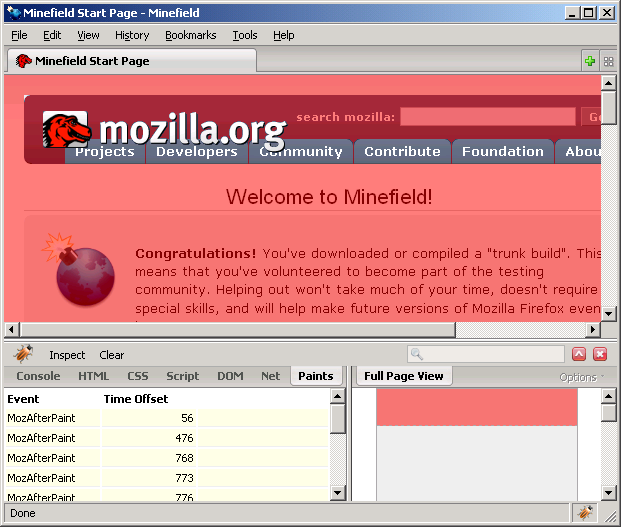
&lt;center&gt;&lt;img src="http://www.kylescholz.com/img/screenshots/firebugpaintevents.png"&gt;&lt;/center&gt;

&lt;p&gt;
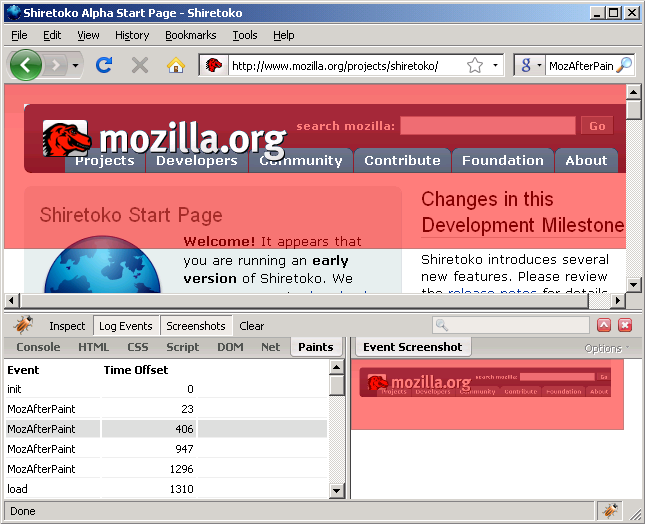
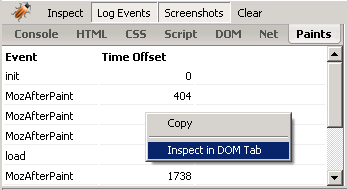
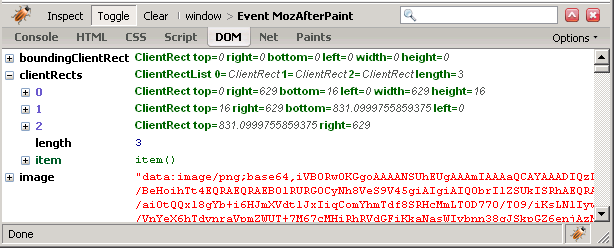
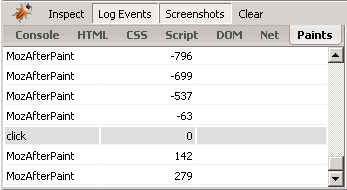
After restarting, you'll have a "Paints" tab in Firebug. Mouse over the events to see the clip areas highlighted. 
&lt;/p&gt;

&lt;p&gt;
Thanks to Mozilla for making MozAfterPaint available! I've only started digging in and I'll try to follow up with some observations. In the meantime, post away, I'm interested in yours.
&lt;/p&gt;
        
    &lt;div class="feedflare"&gt;
&lt;a href="http://feeds.feedburner.com/~f/kylescholz?a=aIsEN"&gt;&lt;img src="http://feeds.feedburner.com/~f/kylescholz?i=aIsEN" border="0"&gt;&lt;/img&gt;&lt;/a&gt; &lt;a href="http://feeds.feedburner.com/~f/kylescholz?a=vdf7N"&gt;&lt;img src="http://feeds.feedburner.com/~f/kylescholz?i=vdf7N" border="0"&gt;&lt;/img&gt;&lt;/a&gt;
&lt;/div&gt;</content>
<feedburner:origLink>http://www.kylescholz.com/blog/2008/11/digging_into_paint_events_in_f_1.html</feedburner:origLink></entry>
<entry>
    <title>A Quick svg2vml Example: Gradients</title>
    <link rel="alternate" type="text/html" href="http://feeds.feedburner.com/~r/kylescholz/~3/104547048/svg2vml_example_digg_b.html" />
    <link rel="service.edit" type="application/atom+xml" href="http://www.kylescholz.com/cgi-bin/mt/mt-atom.cgi/weblog/blog_id=1/entry_id=25" title="A Quick svg2vml Example: Gradients" />
    <id>tag:www.kylescholz.com,2007:/blog//1.25</id>
    
    <published>2007-03-26T20:37:29Z</published>
    <updated>2008-11-16T23:29:29Z</updated>
    
    <summary>A couple weeks ago I mentioned the first release of svg2vml, a lightweight library that enables cross platform, JavaScript-driven vector graphics. Here's a quick example where I use svg2vml to create Digg style gradient buttons: If you're reading from a feed reader that doesn't embed iframes, you'll need to click through to see the example. Check out the frame source for full details. Notice that the button itself is an HTML DIV and that we use CSS and HTML elements to define and position our text. So it's possible to mix HTML and vector graphics as you see fit. We're just scratching the surface. svg2vml can do all kinds of cool stuff. Have fun!...</summary>
    <author>
        <name>kyle scholz</name>
        <uri>www.kylescholz.com</uri>
    </author>
            <category term="javascript" />
            <category term="svg2vml" />
    
    <content type="html" xml:lang="en" xml:base="http://www.kylescholz.com/blog/">
        &lt;p&gt;A couple weeks ago I mentioned the first release of svg2vml, a lightweight library that enables cross platform, JavaScript-driven vector graphics. Here's a quick example where I use svg2vml to create Digg style gradient buttons:&lt;/p&gt;

&lt;p&gt;&lt;i&gt;If you're reading from a feed reader that doesn't embed iframes, you'll need to &lt;a href="http://www.kylescholz.com/blog/2007/03/svg2vml_example_digg_b.html"&gt;click through&lt;/a&gt; to see the example.&lt;/i&gt;&lt;/p&gt;

&lt;iframe src="/projects/svg2vml/0.1.1/digg-button.html" style="width:480px;height:230px;"&gt;&lt;/iframe&gt;

&lt;p&gt;Check out the frame source for full details. Notice that the button itself is an HTML DIV and that we use CSS and HTML elements to define and position our text. So it's possible to mix HTML and vector graphics as you see fit.&lt;/p&gt;

&lt;p&gt;We're just scratching the surface. svg2vml can do all kinds of cool stuff. Have fun!&lt;/p&gt;
        
    &lt;div class="feedflare"&gt;
&lt;a href="http://feeds.feedburner.com/~f/kylescholz?a=q0NVL"&gt;&lt;img src="http://feeds.feedburner.com/~f/kylescholz?i=q0NVL" border="0"&gt;&lt;/img&gt;&lt;/a&gt; &lt;a href="http://feeds.feedburner.com/~f/kylescholz?a=IDK8L"&gt;&lt;img src="http://feeds.feedburner.com/~f/kylescholz?i=IDK8L" border="0"&gt;&lt;/img&gt;&lt;/a&gt;
&lt;/div&gt;</content>
<feedburner:origLink>http://www.kylescholz.com/blog/2007/03/svg2vml_example_digg_b.html</feedburner:origLink></entry>
<entry>
    <title>svg2vml Project Announced</title>
    <link rel="alternate" type="text/html" href="http://feeds.feedburner.com/~r/kylescholz/~3/100845699/svg2vml_project_announced.html" />
    <link rel="service.edit" type="application/atom+xml" href="http://www.kylescholz.com/cgi-bin/mt/mt-atom.cgi/weblog/blog_id=1/entry_id=24" title="svg2vml Project Announced" />
    <id>tag:www.kylescholz.com,2007:/blog//1.24</id>
    
    <published>2007-03-11T04:44:21Z</published>
    <updated>2007-03-11T05:11:14Z</updated>
    
    <summary>Today on the JSViz Blog, Lorien announced svg2vml, a thin translation layer that enables VML capable browsers (Internet Explorer) to display a subset of SVG without any new code. Checkout the full post for details....</summary>
    <author>
        <name>kyle scholz</name>
        <uri>www.kylescholz.com</uri>
    </author>
            <category term="projects" />
            <category term="svg2vml" />
    
    <content type="html" xml:lang="en" xml:base="http://www.kylescholz.com/blog/">
        &lt;p&gt;Today on the &lt;a href="http://www.jsviz.org/blog"&gt;JSViz Blog&lt;/a&gt;, Lorien announced svg2vml, a thin translation layer that enables VML capable browsers (Internet Explorer) to display a subset of SVG without any new code. &lt;/p&gt;

&lt;p&gt;Checkout the &lt;a href="http://www.jsviz.org/blog/2007/03/svg2vml.html"&gt;full post&lt;/a&gt; for details.&lt;/p&gt;
        
    &lt;div class="feedflare"&gt;
&lt;a href="http://feeds.feedburner.com/~f/kylescholz?a=LShOL"&gt;&lt;img src="http://feeds.feedburner.com/~f/kylescholz?i=LShOL" border="0"&gt;&lt;/img&gt;&lt;/a&gt; &lt;a href="http://feeds.feedburner.com/~f/kylescholz?a=bqxYL"&gt;&lt;img src="http://feeds.feedburner.com/~f/kylescholz?i=bqxYL" border="0"&gt;&lt;/img&gt;&lt;/a&gt;
&lt;/div&gt;</content>
<feedburner:origLink>http://www.kylescholz.com/blog/2007/03/svg2vml_project_announced.html</feedburner:origLink></entry>
<entry>
    <title>Gone Googlin'</title>
    <link rel="alternate" type="text/html" href="http://feeds.feedburner.com/~r/kylescholz/~3/88655640/gone_googlin.html" />
    <link rel="service.edit" type="application/atom+xml" href="http://www.kylescholz.com/cgi-bin/mt/mt-atom.cgi/weblog/blog_id=1/entry_id=23" title="Gone Googlin'" />
    <id>tag:www.kylescholz.com,2007:/blog//1.23</id>
    
    <published>2007-02-09T21:15:53Z</published>
    <updated>2007-02-09T21:31:05Z</updated>
    
    <summary>Hey friends, sorry I haven't been posting or responding to any of your e-mails lately! I assure you I've got an excuse. I'm moving from my place in Rochester, New York to California next week to start a new job with Google. I'll let you know more when I can, but please hang tight in the meantime. I've got plenty of JSViz news to share and I'll be posting as time and wifi permit over the next week....</summary>
    <author>
        <name>kyle scholz</name>
        <uri>www.kylescholz.com</uri>
    </author>
            <category term="google" />
    
    <content type="html" xml:lang="en" xml:base="http://www.kylescholz.com/blog/">
        &lt;p&gt;Hey friends, sorry I haven't been posting or responding to any of your e-mails lately! I assure you I've got an excuse. I'm moving from my place in Rochester, New York to California next week to start a new job with Google. I'll let you know more when I can, but please hang tight in the meantime.&lt;/p&gt;

&lt;p&gt;I've got plenty of JSViz news to share and I'll be posting as time and wifi permit over the next week.&lt;/p&gt;
        
    &lt;div class="feedflare"&gt;
&lt;a href="http://feeds.feedburner.com/~f/kylescholz?a=kmz7L"&gt;&lt;img src="http://feeds.feedburner.com/~f/kylescholz?i=kmz7L" border="0"&gt;&lt;/img&gt;&lt;/a&gt; &lt;a href="http://feeds.feedburner.com/~f/kylescholz?a=TedYL"&gt;&lt;img src="http://feeds.feedburner.com/~f/kylescholz?i=TedYL" border="0"&gt;&lt;/img&gt;&lt;/a&gt;
&lt;/div&gt;</content>
<feedburner:origLink>http://www.kylescholz.com/blog/2007/02/gone_googlin.html</feedburner:origLink></entry>
<entry>
    <title>Tutorial: Building a Snowflake Graph from XML</title>
    <link rel="alternate" type="text/html" href="http://feeds.feedburner.com/~r/kylescholz/~3/79943914/tutorial_building_a_snowflake.html" />
    <link rel="service.edit" type="application/atom+xml" href="http://www.kylescholz.com/cgi-bin/mt/mt-atom.cgi/weblog/blog_id=1/entry_id=22" title="Tutorial: Building a Snowflake Graph from XML" />
    <id>tag:www.kylescholz.com,2007:/blog//1.22</id>
    
    <published>2007-01-23T01:27:27Z</published>
    <updated>2007-01-23T01:33:24Z</updated>
    
    <summary>I just posted this new tutorial on jsviz.org... JSViz 0.3.3 includes a few examples to help you get started. In this tutorial, I'm going to go over one of them. We'll create a Snowflake Graph from the contents of an XML file. You can find the example source, with comments based on this tutorial in the 0.3.3 Distribution. Here's the final product 1) Start with a new HTML file Add appropriate JSViz imports and an empty "init()" function body: Continue reading this post at jsviz.org......</summary>
    <author>
        <name>kyle scholz</name>
        <uri>www.kylescholz.com</uri>
    </author>
            <category term="graph" />
            <category term="javascript" />
            <category term="jsviz" />
            <category term="layout" />
            <category term="projects" />
            <category term="tutorial" />
            <category term="visualization" />
    
    <content type="html" xml:lang="en" xml:base="http://www.kylescholz.com/blog/">
        &lt;p&gt;&lt;i&gt;I just posted this new tutorial on &lt;a href="http://www.jsviz.org/blog/2007/01/tutorial_building_a_snowflake.html"&gt;jsviz.org... &lt;/a&gt;&lt;/i&gt;&lt;/p&gt;

&lt;p&gt;
JSViz 0.3.3 includes a few examples to help you get started. In this tutorial, I'm going to go over one of them. We'll create a Snowflake Graph from the contents of an XML file. You can find the example source, with comments based on this tutorial in the &lt;a href="http://www.jsviz.org/wiki/index.php/Download"&gt;0.3.3 Distribution&lt;/a&gt;.
&lt;/p&gt;

&lt;a href="http://jsviz.org/files/jsviz/0.3.3/examples/XMLLoader_Snowflake.html"&gt;Here's the final product&lt;/a&gt;

&lt;p&gt;
&lt;b&gt;1) Start with a new HTML file&lt;/b&gt;
&lt;/p&gt;

&lt;p&gt;Add appropriate JSViz imports and an empty "init()" function body:
&lt;/p&gt;

&lt;p&gt;
&lt;a href="http://www.jsviz.org/blog/2007/01/tutorial_building_a_snowflake.html"&gt;Continue reading this post at jsviz.org...&lt;/a&gt;&lt;/p&gt;
        
    &lt;div class="feedflare"&gt;
&lt;a href="http://feeds.feedburner.com/~f/kylescholz?a=HM1LL"&gt;&lt;img src="http://feeds.feedburner.com/~f/kylescholz?i=HM1LL" border="0"&gt;&lt;/img&gt;&lt;/a&gt; &lt;a href="http://feeds.feedburner.com/~f/kylescholz?a=M4XjL"&gt;&lt;img src="http://feeds.feedburner.com/~f/kylescholz?i=M4XjL" border="0"&gt;&lt;/img&gt;&lt;/a&gt;
&lt;/div&gt;</content>
<feedburner:origLink>http://www.kylescholz.com/blog/2007/01/tutorial_building_a_snowflake.html</feedburner:origLink></entry>
<entry>
    <title>JSViz 0.3.3 Released</title>
    <link rel="alternate" type="text/html" href="http://feeds.feedburner.com/~r/kylescholz/~3/79451849/jsviz_033_released.html" />
    <link rel="service.edit" type="application/atom+xml" href="http://www.kylescholz.com/cgi-bin/mt/mt-atom.cgi/weblog/blog_id=1/entry_id=21" title="JSViz 0.3.3 Released" />
    <id>tag:www.kylescholz.com,2007:/blog//1.21</id>
    
    <published>2007-01-22T04:31:38Z</published>
    <updated>2007-01-29T15:08:26Z</updated>
    
    <summary>The jsviz.org website is now available but I'll be cross-posting big news here to keep subscribers and search traffic informed: JSViz 0.3.3 is now available. This release includes two major features: Snowflake Model is an updated implementation of the "Tree Model" offered in JSViz 0.2. This is a geometric model, offering superior speed to Force Directed layouts, but only capable of representing hierarchical data (sorry, no circuits). An Example Snowflake Graph Layouts offer a simplified interface to the core JSViz libraries. New projects can now be created with minimal code and simple configuration. Additional examples, using Layouts: An Example Force Directed Graph with Data Loader An Example Force Directed Graph with Randomly Generated Data You can download the full source as a single ZIP archive or browse individual files on the Download page I'll follow up with tutorials shortly....</summary>
    <author>
        <name>kyle scholz</name>
        <uri>www.kylescholz.com</uri>
    </author>
            <category term="graph" />
            <category term="javascript" />
            <category term="jsviz" />
            <category term="layout" />
            <category term="projects" />
            <category term="visualization" />
    
    <content type="html" xml:lang="en" xml:base="http://www.kylescholz.com/blog/">
        &lt;p&gt;The &lt;a href="http://www.jsviz.org/blog/"&gt;jsviz.org&lt;/a&gt; website is now available but I'll be cross-posting big news here to keep subscribers and search traffic informed:&lt;/p&gt;

&lt;p&gt;&lt;b&gt;JSViz 0.3.3 is now available&lt;/b&gt;. This release includes two major features:&lt;/p&gt;

&lt;p&gt;&lt;b&gt;Snowflake Model&lt;/b&gt; is an updated implementation of the "Tree Model" offered in JSViz 0.2. This is a geometric model, offering superior speed to Force Directed layouts, but only capable of representing hierarchical data (sorry, no circuits).&lt;/p&gt;

&lt;p&gt;&lt;a href="http://jsviz.org/files/jsviz/0.3.3/examples/XMLLoader_Snowflake.html"&gt;An Example Snowflake Graph&lt;/a&gt;&lt;/p&gt;

&lt;p&gt;&lt;b&gt;Layouts&lt;/b&gt; offer a simplified interface to the core JSViz libraries. New projects can now be created with minimal code and simple configuration. Additional examples, using Layouts:&lt;/p&gt;

&lt;p&gt;&lt;a href="http://jsviz.org/files/jsviz/0.3.3/examples/XMLLoader_ForceDirected.html"&gt;An Example Force Directed Graph with Data Loader&lt;/a&gt;&lt;br /&gt;
&lt;a href="http://jsviz.org/files/jsviz/0.3.3/examples/RandomCircuit_ForceDirected.html"&gt;An Example Force Directed Graph with Randomly Generated Data&lt;/a&gt;&lt;/p&gt;

&lt;p&gt;You can download the full source as a single ZIP archive or browse individual files on the &lt;a href="http://jsviz.org/wiki/index.php/Download"&gt;Download page&lt;/a&gt;&lt;/p&gt;

&lt;p&gt;I'll follow up with tutorials shortly.&lt;/p&gt;
        
    &lt;div class="feedflare"&gt;
&lt;a href="http://feeds.feedburner.com/~f/kylescholz?a=qKQsL"&gt;&lt;img src="http://feeds.feedburner.com/~f/kylescholz?i=qKQsL" border="0"&gt;&lt;/img&gt;&lt;/a&gt; &lt;a href="http://feeds.feedburner.com/~f/kylescholz?a=qSzqL"&gt;&lt;img src="http://feeds.feedburner.com/~f/kylescholz?i=qSzqL" border="0"&gt;&lt;/img&gt;&lt;/a&gt;
&lt;/div&gt;</content>
<feedburner:origLink>http://www.kylescholz.com/blog/2007/01/jsviz_033_released.html</feedburner:origLink></entry>
<entry>
    <title>More Music Mashing</title>
    <link rel="alternate" type="text/html" href="http://feeds.feedburner.com/~r/kylescholz/~3/45641688/more_music_mashing.html" />
    <link rel="service.edit" type="application/atom+xml" href="http://www.kylescholz.com/cgi-bin/mt/mt-atom.cgi/weblog/blog_id=1/entry_id=20" title="More Music Mashing" />
    <id>tag:www.kylescholz.com,2006:/blog//1.20</id>
    
    <published>2006-11-06T04:11:35Z</published>
    <updated>2007-01-24T06:24:06Z</updated>
    
    <summary>I've received a lots of great comments and e-mails about the music recommendations demo I posted a week or so ago. But a number of you mentioned that the recommendations were a little funny. Questions and observations so far: Theivery Corporation is the center of the universe! Every album ever released is 3 or fewer hops away from a Theivery Corporation album. Why is every album I search for related to Beck? or Moby? or Neil Young? Though I'll point out, the man has been in almost every band that's ever released an album. Seriously, that album by the Back Street Boys and Young is one of my favorites! How is this tool useful if the only related albums to my search are by the same artist? Right. So ... There's a lesson here: There's always a little bit of "magic" in a mashup. The music recommendations demo gets album relationships from Amazon.com's E-commerce API. Similarity is based on buying patterns, which apparently lead to some unexpected or disappointing results. So I decided to try out an alternative. I worked up a quick mashup using the Audioscrobbler (Last.fm) API for Artist-to-Artist recommendations. Audioscrobbler uses the listening patterns of it's users...</summary>
    <author>
        <name>kyle scholz</name>
        <uri>www.kylescholz.com</uri>
    </author>
            <category term="force directed" />
            <category term="graph" />
            <category term="javascript" />
            <category term="jsviz" />
            <category term="layout" />
            <category term="projects" />
            <category term="visualization" />
    
    <content type="html" xml:lang="en" xml:base="http://www.kylescholz.com/blog/">
        &lt;p&gt;I've received a lots of great comments and e-mails about the music recommendations demo I posted a week or so ago. But a number of you mentioned that the recommendations were a little funny. Questions and observations so far:&lt;/p&gt;

&lt;ul style="margin-left:14px"&gt;
&lt;li&gt;Theivery Corporation is the center of the universe! Every album ever released is 3 or fewer hops away from a Theivery Corporation album.&lt;/li&gt;
&lt;li&gt;Why is every album I search for related to Beck? or Moby? or &lt;b&gt;Neil Young&lt;/b&gt;? Though I'll point out, the man has been in almost every band that's ever released an album. Seriously, that album by the &lt;b&gt;Back Street Boys and Young&lt;/b&gt; is one of my favorites!&lt;/li&gt;
&lt;li&gt;How is this tool useful if the only related albums to my search are by the same artist?&lt;/li&gt;
&lt;/ul&gt;

&lt;p&gt;Right. So ... There's a lesson here:&lt;p&gt;

&lt;p style="margin-left:20px"&gt;&lt;i&gt;There's always a little bit of &lt;b&gt;"magic"&lt;/b&gt; in a mashup.&lt;/i&gt;&lt;/p&gt;

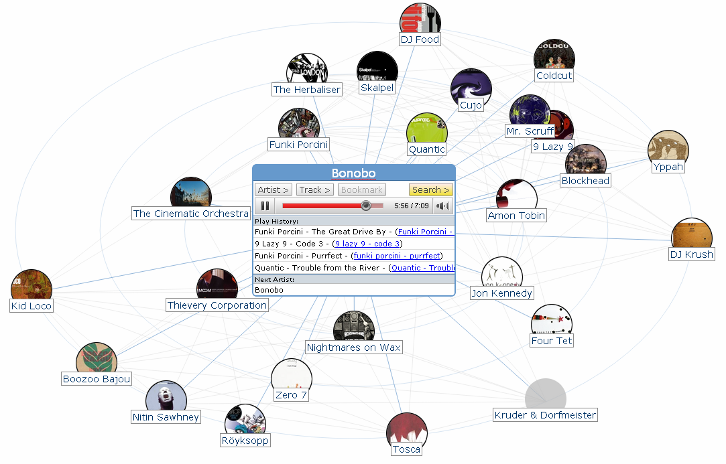
&lt;p&gt;The music recommendations demo gets album relationships from Amazon.com's E-commerce API. Similarity is based on buying patterns, which apparently lead to some unexpected or disappointing results. So I decided to try out an alternative.&lt;/p&gt;

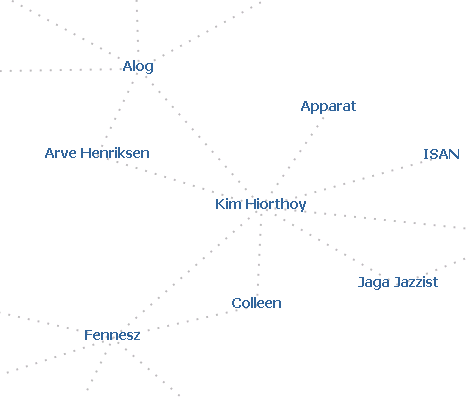
&lt;p&gt;I worked up a quick mashup using the &lt;a href="http://www.audioscrobbler.net/data/webservices/"&gt;Audioscrobbler (Last.fm) API&lt;/a&gt; for Artist-to-Artist recommendations. Audioscrobbler uses the listening patterns of it's users to determine relationships. Unfortunately, the images served up with this API aren't especially useful in identifying artists, &lt;a href="http://static.last.fm/proposedimages/thumbnail/6/2003/13061.jpg"&gt;especially when scaled down&lt;/a&gt;. So this demo is currently text-only. If you're interested, the demo could be extended to grab an album image from Amazon.com. I tried this and bailed out quickly because it added a lot of latency to the addition of new nodes, but you may be able to cut this down using an image cache.&lt;/p&gt;

&lt;center&gt;
&lt;p&gt;&lt;a href="http://www.kylescholz.com/projects/speaking/tae2006/music.fm/#Kim%20Hiorthoy"&gt;&lt;img src="/img/screenshots/music.fm.png" border="0"&gt;&lt;/a&gt;&lt;/p&gt;
&lt;/center&gt;

&lt;p&gt;&lt;a href="http://www.kylescholz.com/projects/speaking/tae2006/music.fm/#Kim%20Hiorthoy"&gt;So give it a try.&lt;/a&gt;&lt;/p&gt;

&lt;p&gt;Oh, one more thing! These demos don't work so well in ie7. This isn't an issue with the JSViz 0.3.1 API. I'll fix the demos when I have some spare time. Thanks for all the feedback. It's useful in driving this project.&lt;/p&gt;
        
    &lt;div class="feedflare"&gt;
&lt;a href="http://feeds.feedburner.com/~f/kylescholz?a=14UML"&gt;&lt;img src="http://feeds.feedburner.com/~f/kylescholz?i=14UML" border="0"&gt;&lt;/img&gt;&lt;/a&gt; &lt;a href="http://feeds.feedburner.com/~f/kylescholz?a=YcXUL"&gt;&lt;img src="http://feeds.feedburner.com/~f/kylescholz?i=YcXUL" border="0"&gt;&lt;/img&gt;&lt;/a&gt;
&lt;/div&gt;</content>
<feedburner:origLink>http://www.kylescholz.com/blog/2006/11/more_music_mashing.html</feedburner:origLink></entry>
<entry>
    <title>New Dojo2D Enables Cross-Platform Vector Graphics</title>
    <link rel="alternate" type="text/html" href="http://feeds.feedburner.com/~r/kylescholz/~3/41248852/dojo2d_enables_cross-platform_vector_graphics.html" />
    <link rel="service.edit" type="application/atom+xml" href="http://www.kylescholz.com/cgi-bin/mt/mt-atom.cgi/weblog/blog_id=1/entry_id=19" title="New Dojo2D Enables Cross-Platform Vector Graphics" />
    <id>tag:www.kylescholz.com,2006:/blog//1.19</id>
    
    <published>2006-10-25T04:45:54Z</published>
    <updated>2006-10-25T06:29:21Z</updated>
    
    <summary> I'm super excited about the new Dojo2D, available in Dojo 0.4.0, which now enables support for vector graphics in virtually every browser! They've created an abstraction layer that supports vector graphics implementations in SVG and VML. So this covers: Internet Explorer 5.0+ (VML) Firefox 1.5+ (SVG) Opera 9.0+ (SVG) Safari (current dev builds) (SVG) Check out these demos (in every browser you can find): Clocks 100 Bubbles The implications of this are huge. Developers and designers can now treat a web page as a 2D canvas and use the familiar DOM event model for user interaction. I'm eager to see what emerges without the constraints of HTML elements, CSS, and their disperate implementations....</summary>
    <author>
        <name>kyle scholz</name>
        <uri>www.kylescholz.com</uri>
    </author>
            <category term="javascript" />
            <category term="visualization" />
    
    <content type="html" xml:lang="en" xml:base="http://www.kylescholz.com/blog/">
        &lt;p&gt;
I'm super excited about the new Dojo2D, available in &lt;a href="http://www.dojotoolkit.org/"&gt;Dojo 0.4.0&lt;/a&gt;, which now enables support for vector graphics in virtually every browser!
&lt;/p&gt;

&lt;p&gt;
They've created an abstraction layer that supports vector graphics implementations in SVG and VML. So this covers:
&lt;ul style="margin-left:14px;"&gt;
&lt;li&gt;Internet Explorer 5.0+ (VML)&lt;/li&gt;
&lt;li&gt;Firefox 1.5+ (SVG)&lt;/li&gt;
&lt;li&gt;Opera 9.0+ (SVG)&lt;/li&gt;
&lt;li&gt;Safari (current dev builds) (SVG)&lt;/li&gt;
&lt;/ul&gt;

&lt;center&gt;
&lt;img src="/img/screenshots/dojo_clock.png"&gt;
&lt;/center&gt;

&lt;p&gt;
Check out these demos (in every browser you can find):
&lt;/p&gt;

&lt;p&gt;&lt;a href="http://archive.dojotoolkit.org/nightly/tests/widget/test_Clock.html"&gt;Clocks&lt;/a&gt;
&lt;/p&gt;
&lt;p&gt;&lt;a href="http://archive.dojotoolkit.org/nightly/demos/gfx/circles.html"&gt;100 Bubbles&lt;/a&gt;
&lt;/p&gt;

&lt;p&gt;
The implications of this are huge. Developers and designers can now treat a web page as a 2D canvas and use the familiar DOM event model for user interaction. I'm eager to see what emerges without the constraints of HTML elements, CSS, and their disperate implementations.
&lt;/p&gt;
        
    &lt;div class="feedflare"&gt;
&lt;a href="http://feeds.feedburner.com/~f/kylescholz?a=ZXF4L"&gt;&lt;img src="http://feeds.feedburner.com/~f/kylescholz?i=ZXF4L" border="0"&gt;&lt;/img&gt;&lt;/a&gt; &lt;a href="http://feeds.feedburner.com/~f/kylescholz?a=oh5BL"&gt;&lt;img src="http://feeds.feedburner.com/~f/kylescholz?i=oh5BL" border="0"&gt;&lt;/img&gt;&lt;/a&gt;
&lt;/div&gt;</content>
<feedburner:origLink>http://www.kylescholz.com/blog/2006/10/dojo2d_enables_cross-platform_vector_graphics.html</feedburner:origLink></entry>
<entry>
    <title>Modeling Music Recommendations in JavaScript with JSViz</title>
    <link rel="alternate" type="text/html" href="http://feeds.feedburner.com/~r/kylescholz/~3/39148980/modeling_music_recommendations_in_javascript_with_jsviz.html" />
    <link rel="service.edit" type="application/atom+xml" href="http://www.kylescholz.com/cgi-bin/mt/mt-atom.cgi/weblog/blog_id=1/entry_id=18" title="Modeling Music Recommendations in JavaScript with JSViz" />
    <id>tag:www.kylescholz.com,2006:/blog//1.18</id>
    
    <published>2006-10-17T17:52:14Z</published>
    <updated>2006-10-20T05:26:27Z</updated>
    
    <summary> Last week I showed you a tutorial that I put together for The Ajax Experience, where we built a force directed model from the contents of an XML file. Today I'm presenting an example with full source from another tutorial in this talk, where we make a complete, interactive application that models music recommendations using Amazon.com's Similarity API. I'll be covering this example in detail in my talk next week at The AJAX Experience. You may view, download, and modify the source in this example. It's available under a Creative Commons Attribution License. This application will enable a user to search for music by artist. When the user selects an album, they'll see a graph model reperesenting the album's relationship to similar albums, based on Amazon.com buying history. Here's a screenshot: Click here to use this example application... A Note on Aesthetics...</summary>
    <author>
        <name>kyle scholz</name>
        <uri>www.kylescholz.com</uri>
    </author>
            <category term="force directed" />
            <category term="graph" />
            <category term="javascript" />
            <category term="jsviz" />
            <category term="layout" />
            <category term="projects" />
            <category term="spring" />
            <category term="tutorial" />
            <category term="visualization" />
    
    <content type="html" xml:lang="en" xml:base="http://www.kylescholz.com/blog/">
        &lt;p&gt;
Last week I showed you a tutorial that I put together for The Ajax Experience, where we built a force directed model from the contents of an XML file. Today I'm presenting an example with full source from another tutorial in this talk, where we make a complete, interactive application that models music recommendations using Amazon.com's Similarity API. I'll be covering this example in detail in my talk next week at The AJAX Experience. You may view, download, and modify the source in this example. It's available under a Creative Commons Attribution License.
&lt;/p&gt;

&lt;p&gt;
This application will enable a user to search for music by artist. When the user selects an album, they'll see a graph model reperesenting the album's relationship to similar albums, based on Amazon.com buying history. Here's a screenshot:
&lt;/p&gt;

&lt;center&gt;
&lt;p&gt;
&lt;a href="http://kylescholz.com/projects/speaking/tae2006/music/#B00005RGIZ"&gt;&lt;img src="http://kylescholz.com/img/screenshots/taemusic.png" border="0"&gt;&lt;/a&gt;
&lt;/p&gt;
&lt;/center&gt;

&lt;p&gt;
&lt;a href="http://kylescholz.com/projects/speaking/tae2006/music/#B00005RGIZ"&gt;Click here to use this example application...&lt;/a&gt;
&lt;/p&gt;

&lt;p&gt;&lt;b&gt;A Note on Aesthetics&lt;/b&gt;&lt;/p&gt;
        &lt;p&gt;
Sure, album covers are square, but circles work better in 2-dimensional, dynamic graphs because they don't have any corners that might obstruct our view -- I think they &lt;b&gt;look neat&lt;/b&gt;, too. Credit for this concept belongs to the authors of &lt;a href="http://www.dimvision.com/musicmap/"&gt;MusicMap&lt;/a&gt;, who created a similar application in Flash in 2004.
&lt;/p&gt;

&lt;p&gt;&lt;b&gt;Example Source&lt;/b&gt;&lt;/p&gt;

&lt;p&gt;
In the &lt;a href="http://www.kylescholz.com/blog/2006/10/post.html"&gt;tutorial I posted last week&lt;/a&gt;, I introduced the JSViz API and demonstrated how to construct a model by implementing a "Loader" to populate a DataGraph and a "NodeHandler" to control the representation of nodes and edges in our model. I've done the same thing here. Here's the source used in this example:
&lt;/p&gt;

&lt;ul style="margin-left:20px"&gt;
&lt;li&gt;&lt;a href="http://kylescholz.com/projects/speaking/tae2006/music/Amazon.js"&gt;Amazon.js&lt;/a&gt;: Loader and Search interface to Amazon.com E-commerce API.&lt;/li&gt;
&lt;li&gt;&lt;a href="http://kylescholz.com/projects/speaking/tae2006/music/HTTP.js"&gt;HTTP.js&lt;/a&gt;: A simple AJAX HTTP client.&lt;/li&gt;
&lt;li&gt;&lt;a href="http://kylescholz.com/projects/speaking/tae2006/music/index.html"&gt;index.html&lt;/a&gt;: The HTML and JavaScript that tie the application together, including the NodeHandler.&lt;/li&gt;
&lt;/ul&gt;

&lt;p&gt;
Of course, this example also uses the JSViz 0.3.1 API. While I work on a permanent home for project files, you can access them &lt;a href="http://www.kylescholz.com/blog/2006/10/jsviz_031_available.html"&gt;in this post from last week&lt;/a&gt;.
&lt;/p&gt;

&lt;p&gt;&lt;b&gt;Extending This Example&lt;/b&gt;&lt;/p&gt;

&lt;p&gt;
This example provides base functionality that you can use to build a rich, interactive application. You might extend or enhance the application by:
&lt;/p&gt;

&lt;ul style="margin-left:20px"&gt;
&lt;li&gt;Providing album details and linking to Amazon.com, ITunes, or other retailer product pages&lt;/li&gt;
&lt;li&gt;Linking to sample audio tracks&lt;/li&gt;
&lt;li&gt;Using node size to convey meaning (ie: Amazon.com SalesRank)&lt;/li&gt;
&lt;li&gt;Handling error conditions, like "no albums found"&lt;/li&gt;
&lt;li&gt;Create circle images using JavaScript (I'm currently using PERL/Image Magick)&lt;/li&gt;
&lt;li&gt;...or atleast use an Alpha Image Loader filter to support transparent backgrounds in IE&lt;/li&gt;
&lt;/ul&gt;
    &lt;div class="feedflare"&gt;
&lt;a href="http://feeds.feedburner.com/~f/kylescholz?a=zQUSL"&gt;&lt;img src="http://feeds.feedburner.com/~f/kylescholz?i=zQUSL" border="0"&gt;&lt;/img&gt;&lt;/a&gt; &lt;a href="http://feeds.feedburner.com/~f/kylescholz?a=p4ULL"&gt;&lt;img src="http://feeds.feedburner.com/~f/kylescholz?i=p4ULL" border="0"&gt;&lt;/img&gt;&lt;/a&gt;
&lt;/div&gt;</content>
<feedburner:origLink>http://www.kylescholz.com/blog/2006/10/modeling_music_recommendations_in_javascript_with_jsviz.html</feedburner:origLink></entry>
<entry>
    <title>Tutorial: Building a Force Directed Graph from XML</title>
    <link rel="alternate" type="text/html" href="http://feeds.feedburner.com/~r/kylescholz/~3/39148981/building_a_force_directed_graph_from_xml.html" />
    <link rel="service.edit" type="application/atom+xml" href="http://www.kylescholz.com/cgi-bin/mt/mt-atom.cgi/weblog/blog_id=1/entry_id=16" title="Tutorial: Building a Force Directed Graph from XML" />
    <id>tag:www.kylescholz.com,2006:/blog//1.16</id>
    
    <published>2006-10-13T22:20:45Z</published>
    <updated>2006-10-20T04:44:44Z</updated>
    
    <summary> Part of my upcoming talk at The Ajax Experience is, of course, about graph-based data visualizations using JSViz. I've worked up a couple of tutorials using the new JSViz 0.3.1 and I'm sharing abbrieviated versions of them here. Conference attendees should find these posts useful as a recap and additional reference for coding your own apps. In this first tutorial, we'll introduce the JSViz 0.3.1 API by modeling the contents of an XML file. The model will render in HTML or SVG if it's available. Of course you can take a look at what we're building before we get started: Screenshot of SVG | Screenshot of HTML | "Live" Example | Hide var toggle20061013 = function( url ) { document.getElementById('frame20061013').style.display = "block"; document.getElementById('frame20061013').src= url; if ( !url ) { document.getElementById('frame20061013').src= "about:blank"; document.getElementById('frame20061013').style.display = "none"; } }...</summary>
    <author>
        <name>kyle scholz</name>
        <uri>www.kylescholz.com</uri>
    </author>
            <category term="force directed" />
            <category term="graph" />
            <category term="javascript" />
            <category term="jsviz" />
            <category term="layout" />
            <category term="projects" />
            <category term="spring" />
            <category term="tutorial" />
            <category term="visualization" />
    
    <content type="html" xml:lang="en" xml:base="http://www.kylescholz.com/blog/">
        &lt;p&gt;
Part of my upcoming talk at &lt;a href="http://www.theajaxexperience.com/"&gt;The Ajax Experience&lt;/a&gt; is, of course, about graph-based data visualizations using JSViz. I've worked up a couple of tutorials using the new JSViz 0.3.1 and I'm sharing &lt;b&gt;abbrieviated&lt;/b&gt; versions of them here. Conference attendees should find these posts useful as a recap and additional reference for coding your own apps.
&lt;/p&gt;

&lt;p&gt;
In this first tutorial, we'll introduce the JSViz 0.3.1 API by modeling the contents of an XML file. The model will render in HTML or SVG if it's available. Of course you can take a look at what we're building before we get started:
&lt;/p&gt;

&lt;p&gt;
&lt;a id="toggle20061013" href="javascript:toggle20061013( 'http://kylescholz.com/img/jsviz/jsviz031SVG.png' )"&gt;
Screenshot of SVG&lt;/a&gt;
|
&lt;a id="toggle20061013" href="javascript:toggle20061013( 'http://kylescholz.com/img/jsviz/jsviz031HTML.png' )"&gt;
Screenshot of HTML&lt;/a&gt;
|
&lt;a id="toggle20061013" href="javascript:toggle20061013( 'http://kylescholz.com/projects/speaking/tae2006/xml/' )"&gt;"Live" Example&lt;/a&gt;
|
&lt;a id="toggle20061013" href="javascript:toggle20061013( '' )"&gt;
Hide&lt;/a&gt;
&lt;/p&gt;

&lt;iframe id="frame20061013" style="display:block;width:100%;height:350px;border:1px solid #444444" border="0" src="http://kylescholz.com/img/jsviz/jsviz031SVG.png" frameborder="0" scrolling="no"&gt;&lt;/iframe&gt;

&lt;script&gt;
  var toggle20061013 = function( url ) {
      document.getElementById('frame20061013').style.display = "block";
      document.getElementById('frame20061013').src= url;
      if ( !url ) {
        document.getElementById('frame20061013').src= "about:blank";
        document.getElementById('frame20061013').style.display = "none";
      }
  }
&lt;/script&gt;
&lt;br&gt;
        &lt;p&gt;&lt;b&gt;Create an HTML File and Import JSViz Files&lt;/b&gt;&lt;/p&gt;

&lt;p&gt;&lt;code&gt;&lt;pre&gt;&amp;lt;html&amp;gt;
  &amp;lt;head&amp;gt;
    &amp;lt;title&amp;gt;JSViz Demo: Modeling XML Data&amp;lt;/title&amp;gt;

    
    &amp;lt;!-- JSViz Libraries --&amp;gt;
    &amp;lt;script language="JavaScript" src="DataGraph.js"&amp;gt;&amp;lt;/script&amp;gt;
    &amp;lt;script language="JavaScript" src="Magnet.js"&amp;gt;&amp;lt;/script&amp;gt;
    &amp;lt;script language="JavaScript" src="Spring.js"&amp;gt;&amp;lt;/script&amp;gt;
    &amp;lt;script language="JavaScript" src="Particle.js"&amp;gt;&amp;lt;/script&amp;gt;
    &amp;lt;script language="JavaScript" src="ParticleModel.js"&amp;gt;&amp;lt;/script&amp;gt;
    &amp;lt;script language="JavaScript" src="Timer.js"&amp;gt;&amp;lt;/script&amp;gt;
    &amp;lt;script language="JavaScript" src="EventHandler.js"&amp;gt;&amp;lt;/script&amp;gt;
    &amp;lt;script language="JavaScript" src="HTMLGraphView.js"&amp;gt;&amp;lt;/script&amp;gt;
    &amp;lt;script language="JavaScript" src="SVGGraphView.js"&amp;gt;&amp;lt;/script&amp;gt;
    &amp;lt;script language="JavaScript" src="RungeKuttaIntegrator.js"&amp;gt;&amp;lt;/script&amp;gt;
    &amp;lt;script language="JavaScript" src="Control.js"&amp;gt;&amp;lt;/script&amp;gt;

    &amp;lt;!-- Demo Libraries --&amp;gt;
    &amp;lt;script language="JavaScript" src="HTTP.js"&amp;gt;&amp;lt;/script&amp;gt;
    &amp;lt;script language="JavaScript" src="XMLLoader.js"&amp;gt;&amp;lt;/script&amp;gt;

    &amp;lt;script&amp;gt;
      function init() {

      }
    &amp;lt;/script&amp;gt;
    
    &amp;lt;style type="text/css"&amp;gt;
      html {
        filter: expression(document.execCommand("BackgroundImageCache", false, true));
      }

      body {
        margin: 0;
        padding: 0;
      }
    &amp;lt;/style&amp;gt;

  &amp;lt;/head&amp;gt;
  &amp;lt;body onload="init()"&amp;gt;

  &amp;lt;/body&amp;gt;
&amp;lt;/html&amp;gt;
&lt;/pre&gt;&lt;/code&gt;&lt;/p&gt;

&lt;p&gt;&lt;b&gt;Identifying Nodes and Relationships&lt;/b&gt;&lt;/p&gt;

&lt;p&gt;
First, let's check out the XML file that contains the data we're going to model.
&lt;/p&gt;

&lt;iframe src="http://kylescholz.com/projects/speaking/tae2006/xml/nodes.xml" style="width:100%;height:200px;border:1px solid #444444" border="0"&gt;&lt;/iframe&gt;

&lt;p&gt;
The file contains a simple XML hierarchy that indicates the relationships in our model. Each node in the graph will be a descendant of "root" and any node may have child nodes. Each node explicitly indicates the mass and color that should be used to represent it in the model. While this XML file defines our graph structure explictly, you may have XML or other data that doesn't. The first step in using JSViz is to process your data into a "DataGraph", where we define the nodes and relationships that we're going to model.
&lt;/p&gt;

&lt;p&gt;
Here I've created a simple XMLLoader that will grab the XML, parse it, and populate our DataGraph.
&lt;/p&gt;

&lt;iframe src="http://kylescholz.com/projects/speaking/tae2006/xml/XMLLoader.js" style="width:100%;height:200px;border:1px solid #444444" border="0"&gt;&lt;/iframe&gt;

&lt;p&gt;
Whether you're retrieving data from an XML file or REST service, you'll need to write some kind of "loader" to populate your DataGraph. Don't hesitate to extend DataGraphNode with any attributes (images, labels, etc.) that may be used to render a node's representation in your model.
&lt;/p&gt;

&lt;p&gt;&lt;b&gt;Setting up our Model&lt;/b&gt;&lt;/p&gt;

&lt;p&gt;
Now we have all the tools we need to build our model. Let's get &lt;b&gt;modelling&lt;/b&gt;! Earlier we created an HTML file, containing an empty init() function. Now we're going to populate it:
&lt;/p&gt;

&lt;p&gt;Get the width and height of our document. We'll use these to keep the nodes in our graph on the page. If you're going to render your graph inside an HTML element (a div or table, etc.), you should instead use the dimensions of that element.&lt;/p&gt;

&lt;p&gt;&lt;pre&gt;&lt;code&gt;var FRAME_WIDTH;
var FRAME_HEIGHT;

if (document.all) {
  FRAME_WIDTH = document.body.offsetWidth - 5;
  FRAME_HEIGHT = document.documentElement.offsetHeight - 5;
} else {
  FRAME_WIDTH = window.innerWidth - 5;
  FRAME_HEIGHT = window.innerHeight - 5;
}
&lt;/code&gt;&lt;/pre&gt;&lt;/p&gt;

&lt;p&gt;Make a view to control the presentation of our model. We'll use SVG wherever it's supported and use HTML where it's not.&lt;/p&gt;

&lt;p&gt;&lt;pre&gt;&lt;code&gt;var view;
if ( document.implementation.hasFeature("org.w3c.dom.svg", '1.1') ) {
  view = new SVGGraphView( 0, 0, FRAME_WIDTH, FRAME_HEIGHT );
} else {
  view = new HTMLGraphView( 0, 0, FRAME_WIDTH, FRAME_HEIGHT );
}
&lt;/code&gt;&lt;/pre&gt;&lt;/p&gt;

&lt;p&gt;Create a ParticleModel that will drive animated positioning of Particles in our model. The ParticleModel contains an animation timer that we can start and stop when appropriate. There aren't any particles in our model yet, but it's ok to start it up now.&lt;/p&gt;

&lt;p&gt;&lt;pre&gt;&lt;code&gt;var particleModel = new ParticleModel( view );
particleModel.start();
&lt;/code&gt;&lt;/pre&gt;&lt;/p&gt;

&lt;p&gt;A set of basic user controls that handle drag-and-drop of particles and window resizing is provided. Most interactive applications will extend this to provide a richer user experience.&lt;/p&gt;

&lt;p&gt;&lt;pre&gt;&lt;code&gt;var control = new Control( particleModel, view );
&lt;/code&gt;&lt;/pre&gt;&lt;/p&gt;

&lt;p&gt;Next we initialize the DataGraph that we discussed above and create a NodeHandler. We're going to code our own NodeHandler below so we'll talk more about it in a moment.&lt;/p&gt;

&lt;p&gt;&lt;pre&gt;&lt;code&gt;var dataGraph = new DataGraph();
var nodeHandler = new NodeHandler( dataGraph, particleModel, view, control );
dataGraph.subscribe( nodeHandler );
&lt;/code&gt;&lt;/pre&gt;&lt;/p&gt;

&lt;p&gt;Initialize the XMLLoader and instruct it to load a file.&lt;/p&gt;

&lt;p&gt;&lt;pre&gt;&lt;code&gt;var xmlLoader = new XMLLoader( dataGraph );
xmlLoader.load( "nodes.xml" );
&lt;/code&gt;&lt;/pre&gt;&lt;/p&gt;

&lt;p&gt;In this demo, we're going to add nodes over time, enabling the model to organize under less entropy. The build timer will add 1 node every 150ms.&lt;/p&gt;

&lt;p&gt;&lt;pre&gt;&lt;code&gt;var buildTimer = new Timer( 150 );
buildTimer.subscribe( nodeHandler );
buildTimer.start();
&lt;/code&gt;&lt;/pre&gt;&lt;/p&gt;

&lt;p&gt;Phew! We're almost done. We just covered all of the contents of the init() function but we still need to implement a NodeHandler to tell our model and view how to interpret the nodes and relationships in the DataGraph.&lt;/p&gt;

&lt;p&gt;&lt;b&gt;Controlling Model and View behavior with a NodeHandler&lt;/b&gt;&lt;/p&gt;

&lt;p&gt;The NodeHandler is where everything comes together. It interprets the DataGraph to determine how to model and present the graph. In this example, we also pass in the "control" defined above because it contains some event handlers that we'll attach to view elements.&lt;/p&gt;

&lt;p&gt;&lt;pre&gt;&lt;code&gt;var NodeHandler = function( dataGraph, particleModel, view, control ) {
  this.dataGraph = dataGraph;
  this.particleModel = particleModel;
  this.view = view;
  this.control = control;
  this.queue = new Array();
&lt;/code&gt;&lt;/pre&gt;&lt;/p&gt;

&lt;p&gt;This NodeHandler observes a DataGraph. It must implement some functions to be notified of new nodes and relationships.&lt;/p&gt;

&lt;p&gt;&lt;pre&gt;&lt;code&gt;this['newDataGraphNode'] = function( dataGraphNode ) {
  this.enqueueNode( dataGraphNode );						
}

this['newDataGraphEdge'] = function( nodeA, nodeB ) {
  // Empty. We learn everything we need from newDataGraphNode()
}
&lt;/code&gt;&lt;/pre&gt;&lt;/p&gt;

&lt;p&gt;This NodeHandler queues nodes for additon to the model. An external timer instructs it to dequeue nodes periodically.&lt;/p&gt;

&lt;p&gt;&lt;pre&gt;&lt;code&gt;this['enqueueNode'] = function( dataGraphNode ) {
  this.queue.push( dataGraphNode );
}

this['dequeueNode'] = function() {
  var node = this.queue.shift();
  if ( node ) {
    this.addParticle( node );						
  }
}

this.update = function() {
  this.dequeueNode();
}
&lt;/code&gt;&lt;/pre&gt;&lt;/p&gt;

&lt;p&gt;Finally, we're about to implement the function that adds particles to our model and constructs the presentation. This one is big so I'm placing comments throughout.&lt;/p&gt;

&lt;p&gt;&lt;pre&gt;&lt;code&gt;this['addParticle'] = function( dataGraphNode ) {
  // Create a particle to represent this data node in our model.
  particle = this.particleModel.makeParticle( dataGraphNode.mass, 0, 0 );

  // Create view for SVG
  if ( document.implementation.hasFeature("org.w3c.dom.svg", '1.1') ) {
    var bubble = document.createElementNS("http://www.w3.org/2000/svg", "circle");
    bubble.setAttribute('stroke', '#888888');
    bubble.setAttribute('stroke-width', '.25px');
    bubble.setAttribute('fill', dataGraphNode.color);
    bubble.setAttribute('r', 6 + 'px');
    bubble.onmousedown =  new EventHandler( control, control.handleMouseDownEvent, particle.id )
    var viewNode = this.view.addNode( particle, bubble );

    // Create view for HTML
  } else {
    var bubble = document.createElement( 'div' );
    bubble.style.position = "absolute";
    bubble.style.width = "12px";
    bubble.style.height = "12px";
						
    var color = dataGraphNode.color;
    color = color.replace( "#", "" );

    bubble.style.backgroundImage = "url(/cgi-bin/bubble.pl?title=&amp;r=12&amp;pt=8&amp;b=888888&amp;c=" + color + ")";

    bubble.innerHTML = '&lt;img width="1" height="1"&gt;';
    bubble.onmousedown =  new EventHandler( control, control.handleMouseDownEvent, particle.id )
    var viewNode = this.view.addNode( particle, bubble );
  }

  // Determine if this particle's position should be fixed.
  if ( dataGraphNode.fixed ) { particle.fixed = true; }

  // Assign a random position to the particle.
  var rx = Math.random()*2-1;
  var ry = Math.random()*2-1;
  particle.positionX = rx;
  particle.positionY = ry;

  // Add a Spring Force between child and parent
  if ( dataGraphNode.parent ) {
    particle.positionX = dataGraphNode.parent.particle.positionX + rx;
    particle.positionY = dataGraphNode.parent.particle.positionY + ry;
    particleModel.makeSpring( particle, dataGraphNode.parent.particle, .2, .2, 10 );
    var props;
    if ( document.implementation.hasFeature("org.w3c.dom.svg", '1.1') ) {
      props = {
        'stroke': dataGraphNode.parent.color,
        'stroke-width': '2px',
        'stroke-dasharray': '2,4'
      }
    } else {
      props = {
        'pixelColor': dataGraphNode.color,
        'pixelWidth': '2px',
        'pixelHeight': '2px',
        'pixels': 5
      }
    }

    this.view.addEdge( particle, dataGraphNode.parent.particle, props );
  }

  // Add repsulsive force between this particle and all other particle.
  for( var j=0, l=this.particleModel.particles.length; j&amp;lt;l; j++ ) {
    if ( this.particleModel.particles[j] != particle ) {
      this.particleModel.makeMagnet( particle, this.particleModel.particles[j], -2000, 10 );
    }
  }

  dataGraphNode.particle = particle;

  // Set a width and height for this particle for bounds checking
  particle.width=12;
  particle.height=12;

  dataGraphNode.viewNode = viewNode;
  return dataGraphNode;
},
&lt;/code&gt;&lt;/pre&gt;&lt;/p&gt;

&lt;p&gt;Got all that? There's a lot to do when we add a particle to the system. Make sure you remember the closing brace on NodeHandler.

&lt;p&gt;&lt;pre&gt;&lt;code&gt;}
&lt;/code&gt;&lt;/pre&gt;&lt;/p&gt;

&lt;p&gt;&lt;b&gt;We're all done!&lt;/b&gt; We've created a force directed graph from the contents of an XML file.&lt;/p&gt;

&lt;p&gt;I'll be covering this tutorial and a lot more, in depth, in a little over a week at &lt;a href="http://www.theajaxexperience.com/"&gt;The Ajax Experience&lt;/a&gt;. I'll post again shortly with another tutorial from this talk. Please comment with any questions or to show us your work. Thanks!&lt;/p&gt;

&lt;p&gt;
&lt;a href="http://kylescholz.com/projects/speaking/tae2006/xml/"&gt;Check out the final product.&lt;/a&gt;
&lt;/p&gt;
    &lt;div class="feedflare"&gt;
&lt;a href="http://feeds.feedburner.com/~f/kylescholz?a=8G5gL"&gt;&lt;img src="http://feeds.feedburner.com/~f/kylescholz?i=8G5gL" border="0"&gt;&lt;/img&gt;&lt;/a&gt; &lt;a href="http://feeds.feedburner.com/~f/kylescholz?a=FoW2L"&gt;&lt;img src="http://feeds.feedburner.com/~f/kylescholz?i=FoW2L" border="0"&gt;&lt;/img&gt;&lt;/a&gt;
&lt;/div&gt;</content>
<feedburner:origLink>http://www.kylescholz.com/blog/2006/10/building_a_force_directed_graph_from_xml.html</feedburner:origLink></entry>
<entry>
    <title>It's new and improved! JSViz 0.3.1</title>
    <link rel="alternate" type="text/html" href="http://feeds.feedburner.com/~r/kylescholz/~3/36631300/jsviz_031_available.html" />
    <link rel="service.edit" type="application/atom+xml" href="http://www.kylescholz.com/cgi-bin/mt/mt-atom.cgi/weblog/blog_id=1/entry_id=17" title="It's new and improved! JSViz 0.3.1" />
    <id>tag:www.kylescholz.com,2006:/blog//1.17</id>
    
    <published>2006-10-13T04:51:41Z</published>
    <updated>2006-10-13T22:18:35Z</updated>
    
    <summary> JSViz 0.3.1 is now available. This release includes many enhancements to Force Directed Graphs and a new, simpler API. A new Tree Graph implementation will be available shortly. So let's see it in action! Tomorrow I'll post a tutorial on how to make this demo: Show Demo var toggle20061012 = function() { if ( document.getElementById('frame20061012').style.display == "none" ) { document.getElementById('frame20061012').style.display = "block"; document.getElementById('frame20061012').src= "http://kylescholz.com/projects/jsviz/0.3/demo1/"; document.getElementById('toggle20061012').innerHTML = "Hide Demo"; } else { document.getElementById('frame20061012').style.display = "none"; document.getElementById('frame20061012').src= "about:blank"; document.getElementById('toggle20061012').innerHTML = "Show Demo"; } } What about the source? The source is available under a Creative Commons Attribution License. Here are the source files for browsing. I'll provide a single file distribution shortly. .files tr { vertical-align: top; } .files td { border-collapse: collapse; border-bottom: 1px solid #888888; padding: 2px; } DataGraph.js Defines the nodes and relationships in our model.. ParticleModel.js The physical model used to position particles. Particle.js Magnet.js An attractive or repulsive force between particles. Spring.js A spring force between particles. Timer.js The animation timer. EventHandler.js An event handler factory. HTMLGraphView.js A view of the model constructed with HTML. SVGGraphView.js A view of the model constructed with SVG. RungeKuttaIntegrator.js Performs fast and accurate approximation of differential equations. Control.js A simple...</summary>
    <author>
        <name>kyle scholz</name>
        <uri>www.kylescholz.com</uri>
    </author>
            <category term="force directed" />
            <category term="graph" />
            <category term="javascript" />
            <category term="jsviz" />
            <category term="layout" />
            <category term="projects" />
            <category term="spring" />
            <category term="visualization" />
    
    <content type="html" xml:lang="en" xml:base="http://www.kylescholz.com/blog/">
        &lt;p&gt;
JSViz 0.3.1 is now available. This release includes many enhancements to Force Directed Graphs and a new, simpler API. A new Tree Graph implementation will be available shortly.
&lt;/p&gt;

&lt;p&gt;
&lt;b&gt;So let's see it in action!&lt;/b&gt;
&lt;/p&gt;

&lt;p&gt;
Tomorrow I'll post a tutorial on how to make this demo:
&lt;/p&gt;

&lt;p&gt;
&lt;a id="toggle20061012" href="javascript:toggle20061012()"&gt;Show Demo&lt;/a&gt;
&lt;/p&gt;

&lt;iframe id="frame20061012" style="display:none;width:100%;height:400px;border:1px solid #444444" border="0" frameborder="0"&gt;&lt;/iframe&gt;

&lt;script&gt;
  var toggle20061012 = function() {
    if ( document.getElementById('frame20061012').style.display == "none" ) {
      document.getElementById('frame20061012').style.display = "block";
      document.getElementById('frame20061012').src= "http://kylescholz.com/projects/jsviz/0.3/demo1/";
      document.getElementById('toggle20061012').innerHTML = "Hide Demo";
    } else {
      document.getElementById('frame20061012').style.display = "none";
      document.getElementById('frame20061012').src= "about:blank";
      document.getElementById('toggle20061012').innerHTML = "Show Demo";
    }
  }
&lt;/script&gt;

&lt;p&gt;
&lt;b&gt;What about the source?&lt;/b&gt;
&lt;/p&gt;

&lt;p&gt;
The source is available under a Creative Commons Attribution License. Here are the source files for browsing. I'll provide a single file distribution shortly.
&lt;/p&gt;

&lt;style&gt;
.files tr {
  vertical-align: top;
}

.files td {
  border-collapse: collapse;
  border-bottom: 1px solid #888888;
  padding: 2px;
}

&lt;/style&gt;

&lt;table class="files"&gt;
  &lt;tr&gt;
&lt;td&gt;&lt;a href="/projects/jsviz/0.3.1/DataGraph.js"&gt;DataGraph.js&lt;/a&gt;&lt;/td&gt;
&lt;td&gt;Defines the nodes and relationships in our model..&lt;/td&gt;
  &lt;/tr&gt;
  &lt;tr&gt;
&lt;td&gt;&lt;a href="/projects/jsviz/0.3.1/ParticleModel.js"&gt;ParticleModel.js&lt;/a&gt;&lt;/td&gt;
&lt;td&gt;The physical model used to position particles.&lt;/td&gt;
  &lt;/tr&gt;
  &lt;tr&gt;
&lt;td&gt;&lt;a href="/projects/jsviz/0.3.1/Particle.js"&gt;Particle.js&lt;/a&gt;&lt;/td&gt;
&lt;td&gt;&lt;/td&gt;
  &lt;/tr&gt;
  &lt;tr&gt;
&lt;td&gt;&lt;a href="/projects/jsviz/0.3.1/Magnet.js"&gt;Magnet.js&lt;/a&gt;&lt;/td&gt;
&lt;td&gt;An attractive or repulsive force between particles.&lt;/td&gt;
  &lt;/tr&gt;
  &lt;tr&gt;
&lt;td&gt;&lt;a href="/projects/jsviz/0.3.1/Spring.js"&gt;Spring.js&lt;/a&gt;&lt;/td&gt;
&lt;td&gt;A spring force between particles.&lt;/td&gt;
  &lt;/tr&gt;
  &lt;tr&gt;
&lt;td&gt;&lt;a href="/projects/jsviz/0.3.1/Timer.js"&gt;Timer.js&lt;/a&gt;&lt;/td&gt;
&lt;td&gt;The animation timer.&lt;/td&gt;
  &lt;/tr&gt;
  &lt;tr&gt;
&lt;td&gt;&lt;a href="/projects/jsviz/0.3.1/EventHandler.js"&gt;EventHandler.js&lt;/a&gt;&lt;/td&gt;
&lt;td&gt;An event handler factory.&lt;/td&gt;
  &lt;/tr&gt;
  &lt;tr&gt;
&lt;td&gt;&lt;a href="/projects/jsviz/0.3.1/HTMLGraphView.js"&gt;HTMLGraphView.js&lt;/a&gt;&lt;/td&gt;
&lt;td&gt;A view of the model constructed with HTML.&lt;/td&gt;
  &lt;/tr&gt;
  &lt;tr&gt;
&lt;td&gt;&lt;a href="/projects/jsviz/0.3.1/SVGGraphView.js"&gt;SVGGraphView.js&lt;/a&gt;&lt;/td&gt;
&lt;td&gt;A view of the model constructed with SVG.&lt;/td&gt;
  &lt;/tr&gt;
  &lt;tr&gt;
&lt;td&gt;&lt;a href="/projects/jsviz/0.3.1/RungeKuttaIntegrator.js"&gt;RungeKuttaIntegrator.js&lt;/a&gt;&lt;/td&gt;
&lt;td&gt;Performs fast and accurate approximation of differential equations.&lt;/td&gt;
  &lt;/tr&gt;
  &lt;tr&gt;
&lt;td&gt;&lt;a href="/projects/jsviz/0.3.1/Control.js"&gt;Control.js&lt;/a&gt;&lt;/td&gt;
&lt;td&gt;A simple template for event handlers in your user interface.&lt;/td&gt;
  &lt;/tr&gt;
&lt;/table&gt;
        
    &lt;div class="feedflare"&gt;
&lt;a href="http://feeds.feedburner.com/~f/kylescholz?a=VBxGL"&gt;&lt;img src="http://feeds.feedburner.com/~f/kylescholz?i=VBxGL" border="0"&gt;&lt;/img&gt;&lt;/a&gt; &lt;a href="http://feeds.feedburner.com/~f/kylescholz?a=OQ7bL"&gt;&lt;img src="http://feeds.feedburner.com/~f/kylescholz?i=OQ7bL" border="0"&gt;&lt;/img&gt;&lt;/a&gt;
&lt;/div&gt;</content>
<feedburner:origLink>http://www.kylescholz.com/blog/2006/10/jsviz_031_available.html</feedburner:origLink></entry>
<entry>
    <title>Live Filter, Guided Search, and User Experience</title>
    <link rel="alternate" type="text/html" href="http://feeds.feedburner.com/~r/kylescholz/~3/20874890/live_filter_guided_search_and_user_experience.html" />
    <link rel="service.edit" type="application/atom+xml" href="http://www.kylescholz.com/cgi-bin/mt/mt-atom.cgi/weblog/blog_id=1/entry_id=15" title="Live Filter, Guided Search, and User Experience" />
    <id>tag:www.kylescholz.com,2006:/blog//1.15</id>
    
    <published>2006-09-10T19:53:07Z</published>
    <updated>2006-10-21T16:05:55Z</updated>
    
    <summary>An interesting post at Unspace discusses how for many applications, a filtering paradigm is more appropriate than traditional search. To use Pete Forde's words: With a search, you start off with nothing and potentially end up with nothing. Counter to this approach is filtering, where we present everything available, and then encourage the user to progressively remove what they do not need. Frequently I hear from the search gurus that under ideal circumstances, search is a conversation; that a dialog must occur between the information consumer and the search provider, guiding the consumer to the desired information. Right on! Search isn't easy. Language is ambiguous and searchers aren't interested in spending several minutes formulating precise queries with complex operators. Guided search can manifest itself in different ways. Suggestions (1 2), recommendations, categorization, and contextualization (see right hand side of results) can all be methods for asking the user, “What did you mean?”. Pete adds filters to the mix and presents an example implementation. I agree with Pete on the concept but wish his implementation provided a more responsive user interface. Currently, as a user applies filters, a counter is updated to indicate the number of matches. A more responsive user...</summary>
    <author>
        <name>kyle scholz</name>
        <uri>www.kylescholz.com</uri>
    </author>
            <category term="in the wild" />
            <category term="reviews" />
            <category term="visualization" />
    
    <content type="html" xml:lang="en" xml:base="http://www.kylescholz.com/blog/">
        &lt;p&gt;An interesting &lt;a href="http://unspace.ca/discover/livefilter"&gt;post at Unspace&lt;/a&gt; discusses how for many applications, a filtering paradigm is more appropriate than traditional search. To use Pete Forde's words:&lt;/p&gt;

&lt;p style="margin-left:20px;font-style:italic;color:#003366"&gt;With a search, you start off with nothing and potentially end up with nothing. Counter to this approach is filtering, where we present everything available, and then encourage the user to progressively remove what they do not need.&lt;/p&gt;

&lt;p&gt;Frequently I hear from the search gurus that under ideal circumstances, &lt;b&gt;search is a conversation&lt;/b&gt;; that a dialog must occur between the information consumer and the search provider, guiding the consumer to the desired information. &lt;b&gt;Right on!&lt;/b&gt; Search isn't easy. Language is ambiguous and searchers aren't interested in spending several minutes formulating precise queries with complex operators.&lt;/p&gt;

&lt;p&gt;&lt;b&gt;Guided search&lt;/b&gt; can manifest itself in different ways. Suggestions (&lt;a href="http://www.google.com/search?q=google+suggets"&gt;1&lt;/a&gt; &lt;a href="http://search.yahoo.com/search?p=the+monkeys"&gt;2&lt;/a&gt;), recommendations, &lt;a href="http://search.dmoz.org/cgi-bin/search?search=the+monkeys"&gt;categorization&lt;/a&gt;, and &lt;a href="http://www.ask.com/web?q=the+monkeys&amp;qsrc=0&amp;o=0&amp;l=dir"&gt;contextualization&lt;/a&gt; &lt;i&gt;(see right hand side of results)&lt;/i&gt;&lt;/a&gt; can all be methods for asking the user, “What did you mean?”. Pete adds filters to the mix and presents an example implementation.&lt;/p&gt;

&lt;center&gt;
&lt;a href="http://unspace.ca/discover/livefilter"&gt;&lt;img src="http://kylescholz.com/img/screenshots/livefilter.gif" style="border:1px solid #444444"&gt;&lt;/a&gt;
&lt;/center&gt;

&lt;p&gt;I agree with Pete on the concept but wish his implementation provided a more responsive user interface. Currently, as a user applies filters, a counter is updated to indicate the number of matches. A more responsive user interface would include the list of matching products inline with the filter options. This would enable the user to identify when they have filtered enough or too much and quickly modify filter citeria accordingly.&lt;/p&gt;

&lt;p&gt;In this way, a filter model can greatly enhance &lt;b&gt;browsability&lt;/b&gt;. Notice that in a traditional search model, when a user reaches a result page, their options are rather limited: pick one of the results, or enter a new query. If the user enters a new query, it isn't related to their last query -- the result sets may not even intersect. By contrast, a filter model can enable the user to alter the scope of their query, effectively &lt;b&gt;zooming in&lt;/b&gt; to a subset or &lt;b&gt;zooming out&lt;/b&gt; to a superset of the results. Every action that a user performs is connected to the actions that preceeded it and actions can be undone when they don't provide a satisfactory result.&lt;/p&gt;

&lt;p&gt;I hope to see more from Pete and Unspace. Thanks for getting the conversation started.&lt;/p&gt;
        
    &lt;div class="feedflare"&gt;
&lt;a href="http://feeds.feedburner.com/~f/kylescholz?a=bBPhL"&gt;&lt;img src="http://feeds.feedburner.com/~f/kylescholz?i=bBPhL" border="0"&gt;&lt;/img&gt;&lt;/a&gt; &lt;a href="http://feeds.feedburner.com/~f/kylescholz?a=pzpbL"&gt;&lt;img src="http://feeds.feedburner.com/~f/kylescholz?i=pzpbL" border="0"&gt;&lt;/img&gt;&lt;/a&gt;
&lt;/div&gt;</content>
<feedburner:origLink>http://www.kylescholz.com/blog/2006/09/live_filter_guided_search_and_user_experience.html</feedburner:origLink></entry>
<entry>
    <title>Webzari Search Visualization by Yahoo! Korea</title>
    <link rel="alternate" type="text/html" href="http://feeds.feedburner.com/~r/kylescholz/~3/10202077/webzari_search_visualization_b.html" />
    <link rel="service.edit" type="application/atom+xml" href="http://www.kylescholz.com/cgi-bin/mt/mt-atom.cgi/weblog/blog_id=1/entry_id=14" title="Webzari Search Visualization by Yahoo! Korea" />
    <id>tag:www.kylescholz.com,2006:/blog//1.14</id>
    
    <published>2006-08-04T13:30:07Z</published>
    <updated>2006-10-21T16:01:13Z</updated>
    
    <summary> TechCrunch posted about WebZari, a Flash-based search visualization: The Yahoo! Korea team has launched a service called Webzari for visualizing the weight of inbound links to any web page and saving the visualization query history in Yahoo!’s social bookmarking service. The interface is in Korean, and it’s not entirely clear how well it works yet, but the basic feature set is discernible and it’s an intriguing thought for the future. The Yahoo! Search team seeks feedback on the project on its blog. I'm curious if people in Korea are more agreeable to the notion of using a 2D web interface to navigate search results, let alone a Flash-based interface that takes a few seconds to load. In any event, I like this for being fun and outside-the-box. Notice the animated comets and the rocket that follows your cursor, displaying the country-of-origin of each link. Hah!...</summary>
    <author>
        <name>kyle scholz</name>
        <uri>www.kylescholz.com</uri>
    </author>
            <category term="in the wild" />
            <category term="visualization" />
    
    <content type="html" xml:lang="en" xml:base="http://www.kylescholz.com/blog/">
        &lt;p&gt;
&lt;a href="http://www.techcrunch.com/2006/07/27/yahoos-webzari-visualizes-link-authority/"&gt;TechCrunch posted&lt;/a&gt; about &lt;a href="http://kr.webzari.search.yahoo.com/search/webzari?p=http%3A%2F%2Fwww.kylescholz.com%2Fblog%2F2006%2F06%2Fforce_directed_graphs_in_javas.html&amp;ret=1&amp;fr=kr-search_top&amp;x=0&amp;y=0"&gt;WebZari&lt;/a&gt;, a Flash-based search visualization:
&lt;/p&gt;

&lt;p style="color:#336699;margin-left:40px"&gt;&lt;i&gt;
The Yahoo! Korea team has launched a service called Webzari for visualizing the weight of inbound links to any web page and saving the visualization query history in Yahoo!’s social bookmarking service. The interface is in Korean, and it’s not entirely clear how well it works yet, but the basic feature set is discernible and it’s an intriguing thought for the future. The Yahoo! Search team seeks feedback on the project on its blog.
&lt;/i&gt;&lt;/p&gt;

&lt;div&gt;
&lt;center&gt;
&lt;img src="/img/screenshots/screenshot_webzari.png" style="border: 1px solid #444444"&gt;
&lt;/center&gt;
&lt;/div&gt;

&lt;div&gt;
&lt;p&gt;
I'm curious if people in Korea are more agreeable to the notion of using a 2D web interface to navigate search results, let alone a Flash-based interface that takes a few seconds to load. In any event, I like this for being &lt;b&gt;fun and outside-the-box&lt;/b&gt;. Notice the animated comets and the rocket that follows your cursor, displaying the country-of-origin of each link. Hah!&lt;/p&gt;
&lt;/div&gt;
        
    &lt;div class="feedflare"&gt;
&lt;a href="http://feeds.feedburner.com/~f/kylescholz?a=xzgSL"&gt;&lt;img src="http://feeds.feedburner.com/~f/kylescholz?i=xzgSL" border="0"&gt;&lt;/img&gt;&lt;/a&gt; &lt;a href="http://feeds.feedburner.com/~f/kylescholz?a=rP3iL"&gt;&lt;img src="http://feeds.feedburner.com/~f/kylescholz?i=rP3iL" border="0"&gt;&lt;/img&gt;&lt;/a&gt;
&lt;/div&gt;</content>
<feedburner:origLink>http://www.kylescholz.com/blog/2006/08/webzari_search_visualization_b.html</feedburner:origLink></entry>
<entry>
    <title>Tutorial: Creating Animated Graphs with JavaScript and JSViz</title>
    <link rel="alternate" type="text/html" href="http://feeds.feedburner.com/~r/kylescholz/~3/19204287/tutorial_creating_animated_gra.html" />
    <link rel="service.edit" type="application/atom+xml" href="http://www.kylescholz.com/cgi-bin/mt/mt-atom.cgi/weblog/blog_id=1/entry_id=13" title="Tutorial: Creating Animated Graphs with JavaScript and JSViz" />
    <id>tag:www.kylescholz.com,2006:/blog//1.13</id>
    
    <published>2006-08-04T04:26:51Z</published>
    <updated>2006-10-21T16:00:12Z</updated>
    
    <summary>In this tutorial, you'll learn how to integrate JavaScript Force Directed and Tree graphs into your web page or application using: HTML and CSS JavaScript with the DOM or JavaScript with SVG Click here to see what we're building... Select a configuration: Force Directed in HTML - Tree Graph in HTML - Force Directed in SVG - Tree Graph in SVG function show_example_0803( url ) { var frame = document.getElementById('examples_0803_frame'); frame.src=url; } function toggle_example_0803() { var examples = document.getElementById('examples_0803'); var link = document.getElementById('link_example_0803'); if ( examples.style.display == 'none' ) { examples.style.display='block'; show_example_0803( '/projects/jsviz/0.2/a/examples/fd/tutorial01.html' ); link.innerHTML="Click here to hide preview..."; } else { examples.style.display='none'; show_example_0803( 'about:blank' ); link.innerHTML="Click here to see what we're building..."; } }...</summary>
    <author>
        <name>kyle scholz</name>
        <uri>www.kylescholz.com</uri>
    </author>
            <category term="force directed" />
            <category term="jsviz" />
            <category term="projects" />
            <category term="tree graphs" />
    
    <content type="html" xml:lang="en" xml:base="http://www.kylescholz.com/blog/">
        &lt;p&gt;In this tutorial, you'll learn how to integrate JavaScript Force Directed and Tree graphs into your web page or application using:
&lt;ul style="margin-left:8px;padding-left:8px;"&gt;
&lt;li&gt;HTML and CSS&lt;/li&gt;
&lt;li&gt;JavaScript with the DOM&lt;/li&gt;
&lt;li&gt;or JavaScript with SVG&lt;/li&gt;
&lt;/ul&gt;
&lt;/p&gt;

&lt;p&gt;
&lt;a href="javascript:toggle_example_0803()" id="link_example_0803"&gt;&lt;img src="/img/tri.png" border="0"&gt;Click here to see what we're building...&lt;/a&gt;
&lt;div id="examples_0803" style="display:none"&gt;
&lt;center&gt;
  &lt;table cellpadding="0" cellspacing="0" width="600" border="0"&gt;
    &lt;tr valign="top"&gt;
      &lt;td align="center"&gt;

  Select a configuration:

  &lt;table cellpadding="0" cellspacing="0"&gt;
    &lt;tr valign="middle"&gt;
      &lt;td class="nav_head"&gt;&lt;a class="nav_head" href="javascript:show_example_0803('/projects/jsviz/0.2/a/examples/fd/tutorial01.html');"&gt;Force Directed in HTML&lt;/a&gt;&lt;/td&gt;
      &lt;td&gt;-&lt;/td&gt;
      &lt;td class="nav_head"&gt;&lt;a class="nav_head" href="javascript:show_example_0803('/projects/jsviz/0.2/a/examples/tree/tutorial01.html');"&gt;Tree Graph in HTML&lt;/a&gt;&lt;/td&gt;
      &lt;td&gt;-&lt;/td&gt;
      &lt;td class="nav_head"&gt;&lt;a class="nav_head" href="javascript:show_example_0803('/projects/jsviz/0.2/a/examples/svg/tutorial01_fd.html');"&gt;Force Directed in SVG&lt;/a&gt;&lt;/td&gt;
      &lt;td&gt;-&lt;/td&gt;
      &lt;td class="nav_head"&gt;&lt;a class="nav_head" href="javascript:show_example_0803('/projects/jsviz/0.2/a/examples/svg/tutorial01_tree.html');"&gt;Tree Graph in SVG&lt;/a&gt;&lt;/td&gt;
    &lt;/tr&gt;
  &lt;/table&gt;

      &lt;/td&gt;
    &lt;/tr&gt;
    &lt;tr&gt;
      &lt;td align="center"&gt;
  &lt;iframe id="examples_0803_frame" src="about:blank" width="520" height="400"
    scrolling="no" frameborder="0" style="border:1px solid #888888;margin-top:4px"&gt;&lt;/iframe&gt;
    &lt;/tr&gt;
  &lt;/table&gt;
&lt;/center&gt;
&lt;/div&gt;
&lt;/p&gt;

&lt;script language="javascript"&gt;
  function show_example_0803( url ) {
    var frame = document.getElementById('examples_0803_frame');
    frame.src=url;
  }

  function toggle_example_0803() {
    var examples = document.getElementById('examples_0803');
    var link = document.getElementById('link_example_0803');
    if ( examples.style.display == 'none' ) {
      examples.style.display='block';
      show_example_0803( '/projects/jsviz/0.2/a/examples/fd/tutorial01.html' );
      link.innerHTML="Click here to hide preview...";
    } else {
      examples.style.display='none';
      show_example_0803( 'about:blank' );
      link.innerHTML="Click here to see what we're building...";
    }
  }

&lt;/script&gt;
        &lt;p&gt;
If you're new to JSViz, or even new to JavaScript, this tutorial should be enough to get you rolling. Let's start out with this HTML document:
&lt;pre&gt;&lt;code style="color:#336699"&gt;&amp;lt;html&amp;gt;
  &amp;lt;head&amp;gt;
    &amp;lt;title&amp;gt;JSViz 0.2 Tutorial&amp;lt;/title&amp;gt;
    &amp;lt;script language="JavaScript"&amp;gt;
      function init() {
      }
    &amp;lt;/script&amp;gt;
  &amp;lt;/head&amp;gt;
  &amp;lt;body onload="init()"&amp;gt;
    &amp;lt;center&gt;&amp;lt;br&amp;gt;
      &amp;lt;div id="frame" style="border:3px dashed #ccccdd;width:500px;height:350px;"&amp;gt;&amp;lt;/div&amp;gt;
    &amp;lt;/center&amp;gt;
  &amp;lt;/body&amp;gt;
&amp;lt;/html&amp;gt;&lt;/pre&gt;&lt;/code&gt;
&lt;/p&gt;

&lt;p&gt;
The "frame" div that we've created will hold our graph. It's going to be useful to have the dimensions of the frame available in the next several steps, so let's add this code to the init() function:
&lt;pre&gt;&lt;code style="color:#336699"&gt;    // Get the dimensions of our 'frame' element
    var frame = document.getElementById('frame');
    var frameLeft = parseInt(frame.offsetLeft);
    var frameTop = parseInt(frame.offsetTop);
    var frameWidth = parseInt(frame.style.width);
    var frameHeight = parseInt(frame.style.height);
&lt;/code&gt;&lt;/pre&gt;
&lt;p&gt;

&lt;p&gt;&lt;b&gt;Now it's decision time!&lt;/b&gt;&lt;/p&gt;

&lt;p&gt;Which graph model will work best with your data? &lt;b&gt;Force Directed Graphs&lt;/b&gt; look neat and can handle all kinds of connected graphs. &lt;b&gt;Tree Graphs&lt;/b&gt; render faster, but can only support data that can be organized into branches and leaves (no circuits).&lt;/p&gt;

&lt;p&gt;How do you want to create and display your graph? It depends on you and your audience. You can make a graph node out of virtually any &lt;b&gt;HTML&lt;/b&gt; element on your page or create elements using &lt;b&gt;JavaScript&lt;/b&gt; and your graph will display on most browsers. If you plan on just using shapes and text, &lt;b&gt;SVG&lt;/b&gt; is prettier and maybe a little faster, but is only currently supported by FireFox 1.5 and above. Users with other browsers will require a plug-in.&lt;/p&gt;

&lt;p&gt;I'm going to dive into detail on Force Directed Graphs with a DOM view. The interfaces to other models and views are very similar, so you'll learn how the libraries work. At the end of the article, you'll find an example worked up for the other Model / View combinations.&lt;/p&gt;

&lt;p&gt;First, we need to import the appropriate libraries. Add these script imports to the &amp;lt;head&amp;gt; section of your HTML page.&lt;/p&gt;

&lt;p&gt;
&lt;pre&gt;&lt;code style="color:#336699"&gt;    &amp;lt;script src="EventHandler.js"&amp;gt;&amp;lt;/script&amp;gt;
    &amp;lt;script src="Timer.js"&amp;gt;&amp;lt;/script&amp;gt;
    &amp;lt;script src="GraphModel.js"&amp;gt;&amp;lt;/script&amp;gt;
    &amp;lt;script src="FDGraphModel.js"&amp;gt;&amp;lt;/script&amp;gt;
    &amp;lt;script src="GraphView.js"&amp;gt;&amp;lt;/script&gt;
    &amp;lt;script src="DOMGraphView.js"&amp;gt;&amp;lt;/script&gt;
    &amp;lt;script src="DOMFDGraphController.js"&amp;gt;&amp;lt;/script&gt;&lt;/code&gt;&lt;/pre&gt;&lt;/p&gt;
&lt;/p&gt;

&lt;p&gt;Now we're going to do something strange ... You see, &lt;b&gt;Internet Explorer is a little wonky&lt;/b&gt; when it comes to moving images around the screen. I can hardly believe it, but if we don't preload an image, IE tries to fetch it every time we reposition it! Since we're constantly moving images around, this results in hundreds or thousands of requests! The images flicker or don't even display until the graph settles. &lt;a href="http://dean.edwards.name/my/flicker.html"&gt;Dean Edwards&lt;/a&gt; and others have tackled this problem in clever ways, but I'm taking the cowards way out.&lt;/p&gt;

&lt;p&gt;Add this to the &amp;lt;body&amp;gt; to preload all of the images we'll use in this tutorial:
&lt;pre&gt;&lt;code style="color:#336699"&gt;    &amp;lt;div id="img_preload" style="position:absolute;display:none;"&amp;gt;
      &amp;lt;img src="http://www.kylescholz.com/cgi-bin/bubble.pl?title=&amp;r=12&amp;pt=8&amp;b=656565&amp;c=99ee55"&amp;gt;
      &amp;lt;img src="http://www.kylescholz.com/cgi-bin/bubble.pl?title=&amp;r=24&amp;pt=8&amp;b=656565&amp;c=ee9944"&amp;gt;
      &amp;lt;img src="http://www.kylescholz.com/cgi-bin/bubble.pl?title=&amp;r=16&amp;pt=8&amp;b=656565&amp;c=eeee66"&amp;gt;
      &amp;lt;img src="http://www.kylescholz.com/cgi-bin/bubble.pl?title=&amp;r=9&amp;pt=8&amp;b=656565&amp;c=6688ee"&amp;gt;
    &amp;lt;/div&amp;gt;&lt;/code&gt;&lt;/pre&gt;
&lt;/p&gt;

&lt;p&gt;Now we'll instantiate a controller. Most of your application's interaction with the graph takes place through this object.&lt;/p&gt;

&lt;p&gt;Add the following to the init() function:
&lt;pre&gt;&lt;code style="color:#336699"&gt;      // Instantiate the Controller
      var controller = new DOMFDGraphController( frameWidth, frameHeight, frameLeft, frameTop );&lt;/code&gt;&lt;/pre&gt;
&lt;/p&gt;

&lt;p&gt;Next, we'll create a root node. In a Tree graph, this is the trunk of the Tree (it's gotta start somewhere, right?). In a Force Directed Graph, all of the nodes share an edge with the root. It keeps them from floating out into space. In your application, you may find it practical to have multiple root nodes.&lt;/p&gt;

&lt;p&gt;You can create the node with HTML or JavaScript&lt;/&gt;

&lt;p&gt;To use HTML, add the following to the body of the document:
&lt;pre&gt;&lt;code style="color:#336699"&gt;    &amp;lt;div id="domRoot" style="width:12px;height:12px;
    background-image:url('http://www.kylescholz.com/cgi-bin/bubble.pl?title=&amp;r=12&amp;pt=8&amp;b=656565&amp;c=99ee55');
    display:none;"&amp;gt;
    	&amp;lt;img width="1" height="1"
    &gt;&amp;lt;/div&amp;gt;
&lt;/code&gt;&lt;/pre&gt;
Then append the following to the init() function:
&lt;pre&gt;&lt;code style="color:#336699"&gt;      var domRoot = document.getElementById('root');&lt;/code&gt;&lt;/pre&gt;
&lt;/p&gt;

&lt;p&gt;Or, to use JavaScript, append the following to the init() function:
&lt;pre&gt;&lt;code style="color:#336699"&gt;      var domRoot = document.createElement("div");
      domRoot.style.width = "12px";
      domRoot.style.height = "12px";
      domRoot.innerHTML = '&amp;lt;img width="1" height="1"&amp;gt;'; // hacky, but necessary to render in IE
      // we use the background-image rather than a foreground image so we don't confuse the browser's
      // image drag-and-drop feature
      domRoot.style.backgroundImage = "url('http://www.kylescholz.com/cgi-bin/bubble.pl?title=&amp;r=12&amp;pt=8&amp;b=656565&amp;c=99ee55')";
      document.body.appendChild( domRoot );&lt;/code&gt;&lt;/pre&gt;
&lt;/p&gt;

&lt;p&gt;Then we add the root node to our graph, positioned in the center of our frame:&lt;/p&gt;
&lt;pre&gt;&lt;code style="color:#336699"&gt;      var root = controller.addRootNode( domRoot, false, 8, true, parseInt(frameWidth/2), parseInt(frameHeight/2) );&lt;/code&gt;&lt;/pre&gt;
&lt;p&gt;

&lt;p&gt;There are a bunch of parameters to addRootNode(). Here's quick overview:
&lt;ul style="margin-left:8px;padding-left:8px;"&gt;
&lt;li&gt;domElement: A reference to an element in the DOM that should either be cloned, or added directly to the graph.&lt;/li&gt;
&lt;li&gt;doClone: A boolean indicated that specifies whether the domElement should be cloned or added directly.&lt;/li&gt;
&lt;li&gt;mass: The mass of the new node, used in force calculations.&lt;/li&gt;
&lt;li&gt;isStatic: A boolean that indicates whether this node can move.&lt;/li&gt;
&lt;li&gt;startX: The initial x-coordinate of this node's position.&lt;/li&gt;
&lt;li&gt;startY: The initial y-coordinate of this node's position.&lt;/li&gt;
&lt;/ul&gt;
&lt;/p&gt;

&lt;p&gt;Now we're ready to add other nodes to the graph! The easiest way to do this is to add a clone of the root node:
&lt;pre&gt;&lt;code style="color:#336699"&gt;      var nodeA = root.addEdge( root, true, false );&lt;/pre&gt;&lt;/code&gt;
&lt;/p&gt;

&lt;p&gt;Your application will probably create nodes to represent a dataset located on your HTML page or accessible via an AJAX call. There are a lot of different ways you can express your data. Let's experiment with different kinds nodes and edges, and different ways you can add them to your graph. All of this code can be appended to the init() function. First we'll add a large node with more mass:
&lt;pre&gt;&lt;code style="color:#336699"&gt;      var domB = document.createElement("div");
      domB.style.width = "24px";
      domB.style.height = "24px";
      domB.innerHTML = '&lt;img width="1" height="1"&gt;';
      domB.style.backgroundImage = "url('http://www.kylescholz.com/cgi-bin/bubble.pl?title=&amp;r=24&amp;pt=8&amp;b=656565&amp;c=ee9944')";
      document.body.appendChild( domB );
      var nodeB = root.addEdge( domB, false, false, 40, 8 );&lt;/code&gt;&lt;/pre&gt;
&lt;p&gt;

&lt;p&gt;Then we'll add a child node to this new node:
&lt;pre&gt;&lt;code style="color:#336699"&gt;      var domC = document.createElement("div");
      domC.style.width = "9px";
      domC.style.height = "9px";
      domC.innerHTML = '&lt;img width="1" height="1"&gt;';
      domC.style.backgroundImage = "url('http://www.kylescholz.com/cgi-bin/bubble.pl?title=&amp;r=9&amp;pt=8&amp;b=656565&amp;c=6688ee')";
      document.body.appendChild( domC );
      var nodeC = nodeB.addEdge( domC, false, true, 30, 3 );&lt;/code&gt;&lt;/pre&gt;
&lt;/p&gt;

&lt;p&gt;Now we'll try a text node:
&lt;pre&gt;&lt;code style="color:#336699"&gt;      var domD = document.createElement("div");
      domD.style.display = "inline";
      domD.innerHTML = 'text';
      document.body.appendChild( domD );
      var nodeD = nodeB.addEdge( domD, false, true, 30, 4 );&lt;/code&gt;&lt;/pre&gt;
&lt;/p&gt;

&lt;p&gt;We can clone that text node and change it's contents:
&lt;pre&gt;&lt;code style="color:#336699"&gt;      var nodeE = root.addEdge( domD, true, false, 50, 4 );
      nodeE.viewNode.innerHTML = 'more text';&lt;/code&gt;&lt;/pre&gt;
&lt;/p&gt;

&lt;p&gt;And some other arbitrary nodes:
&lt;pre&gt;&lt;code style="color:#336699"&gt;      for( var i=0; i&lt;4; i++ ) {
        root.addEdge( domRoot, true, false );
        root.addEdge( domC, true, false, 50, 3 );
      }&lt;/code&gt;&lt;/pre&gt;
&lt;/p&gt;

&lt;p&gt;How about another static node?
&lt;pre&gt;&lt;code style="color:#336699"&gt;      var domF = document.createElement("div");
      domF.style.width = "16px";
      domF.style.height = "16px";
      domF.innerHTML = '&lt;img width="1" height="1"&gt;';
      domF.style.backgroundImage = 
        "url('http://www.kylescholz.com/cgi-bin/bubble.pl?title=&amp;r=16&amp;pt=8&amp;b=656565&amp;c=eeee66')";
      document.body.appendChild( domF );
      var nodeF = 
        controller.addRootNode( domF, false, 6, true, parseInt(frameWidth/2)+50, parseInt(frameHeight/2) );&lt;/code&gt;&lt;/pre&gt;
&lt;/p&gt; 

&lt;p&gt;Finally, an HTML table to top it all off:
&lt;pre&gt;&lt;code style="color:#336699"&gt;      var d1 = document.createElement("td");
      d1.innerHTML="column 1";
      var d2 = document.createElement("td");
      d2.innerHTML="column 2";
      var tr = document.createElement("tr");
      tr.appendChild(d1);
      tr.appendChild(d2);
      var tbody = document.createElement("tbody");
      tbody.appendChild( tr );
      var table = document.createElement("table");
      table.border=1;
      table.appendChild( tbody );
      document.body.appendChild(table);
      nodeF.addEdge( table, false, false, 50, 3 );&lt;/code&gt;&lt;/pre&gt;
&lt;/p&gt;

&lt;p&gt;That's it! Give it a shot in your app and leave us a link!&lt;p&gt;
    &lt;div class="feedflare"&gt;
&lt;a href="http://feeds.feedburner.com/~f/kylescholz?a=IDoGL"&gt;&lt;img src="http://feeds.feedburner.com/~f/kylescholz?i=IDoGL" border="0"&gt;&lt;/img&gt;&lt;/a&gt; &lt;a href="http://feeds.feedburner.com/~f/kylescholz?a=0TE0L"&gt;&lt;img src="http://feeds.feedburner.com/~f/kylescholz?i=0TE0L" border="0"&gt;&lt;/img&gt;&lt;/a&gt;
&lt;/div&gt;</content>
<feedburner:origLink>http://www.kylescholz.com/blog/2006/08/tutorial_creating_animated_gra.html</feedburner:origLink></entry>
<entry>
    <title>JSViz 0.2a Design Overview</title>
    <link rel="alternate" type="text/html" href="http://feeds.feedburner.com/~r/kylescholz/~3/10202079/jsviz_02a_design_overview_1.html" />
    <link rel="service.edit" type="application/atom+xml" href="http://www.kylescholz.com/cgi-bin/mt/mt-atom.cgi/weblog/blog_id=1/entry_id=9" title="JSViz 0.2a Design Overview" />
    <id>tag:www.kylescholz.com,2006:/blog//1.9</id>
    
    <published>2006-08-02T20:18:49Z</published>
    <updated>2006-10-21T15:59:26Z</updated>
    
    <summary>I put together some diagrams to describe the JSViz 0.2a design. I'm looking for comments to guide the design of the 0.2 release. Please let me know what you think: The core of the design is a traditional Model / View / Controller (MVC). I'm not going to go into detail about MVC here, but Wikipedia has plenty of detail here. MVC offers an elegant means to recycle and swap implementations of the principle components of a system. Here's a high level view of JSViz 2.0a:...</summary>
    <author>
        <name>kyle scholz</name>
        <uri>www.kylescholz.com</uri>
    </author>
            <category term="force directed" />
            <category term="jsviz" />
            <category term="projects" />
            <category term="tree graphs" />
    
    <content type="html" xml:lang="en" xml:base="http://www.kylescholz.com/blog/">
        &lt;p&gt;I put together some diagrams to describe the JSViz 0.2a design. I'm looking for comments to guide the design of the 0.2 release. &lt;b&gt;Please&lt;/b&gt; let me know what you think:&lt;/p&gt;

&lt;p&gt;The core of the design is a traditional Model / View / Controller (MVC). I'm not going to go into detail about MVC here, but Wikipedia &lt;a href="http://en.wikipedia.org/wiki/Model_view_controller"&gt;has plenty of detail here&lt;/a&gt;. MVC offers an elegant means to recycle and swap implementations of the principle components of a system. Here's a high level view of JSViz 2.0a:&lt;/p&gt;

&lt;center&gt;&lt;img src="http://kylescholz.com/img/jsviz/MVC.png"&gt;&lt;/center&gt;
        &lt;p&gt;Our components are:
&lt;ul style="margin-left:8px;padding-left:8px;"&gt;
&lt;li&gt;&lt;b&gt;&lt;a href="/projects/jsviz/0.2/a/GraphModel.js"&gt;GraphModel&lt;/a&gt;:&lt;/b&gt; Representation of nodes and edges in a graph, and also the algorithms used to position these objects in space. JSViz 0.2a supports &lt;a href="/projects/jsviz/0.2/a/FDGraphModel.js"&gt;"Force Directed"&lt;/a&gt; and &lt;a href="/projects/jsviz/0.2/a/TreeGraphModel.js"&gt;"Tree"&lt;/a&gt; models.&lt;/li&gt;
&lt;li&gt;&lt;b&gt;&lt;a href="/projects/jsviz/0.2/a/GraphView.js"&gt;GraphView&lt;/a&gt;:&lt;/b&gt; Produces a displayable representation of the model. JSViz 0.2a includes &lt;a href="/projects/jsviz/0.2/a/DOMGraphView.js"&gt;"DOM"&lt;/a&gt; and &lt;a href="/projects/jsviz/0.2/a/SVGGraphView.js"&gt;"SVG"&lt;/a&gt; views.&lt;/li&gt;
&lt;li&gt;&lt;b&gt;GraphController:&lt;/b&gt; Handles events that modify the model and view. In  the current design, an implementation of GraphController is required for each model / view combination.&lt;/li&gt;
&lt;/ul&gt;
&lt;/p&gt;

&lt;p&gt;The abstract classes define a minimum set of functionality that must be included in each concrete implementation. For example, an implementation of GraphModel must enable a client to add nodes and edges, and update the positions of objects in the graph. And a GraphView must enable a client to draw nodes and edges as their positions change. The diagram below adds in some concrete classes.&lt;/p&gt;

&lt;center&gt;&lt;img src="http://kylescholz.com/img/jsviz/MVC_Inheritence.png"&gt;&lt;/center&gt;

&lt;p&gt;Most of your application's interactions with the graph will take place through a concrete implementation of GraphController. This is better illustrated with code, so I'm going to follow up with a usage walk-through. If you have any comments in the meantime, please leave 'em below.&lt;/p&gt;
    &lt;div class="feedflare"&gt;
&lt;a href="http://feeds.feedburner.com/~f/kylescholz?a=xlueL"&gt;&lt;img src="http://feeds.feedburner.com/~f/kylescholz?i=xlueL" border="0"&gt;&lt;/img&gt;&lt;/a&gt; &lt;a href="http://feeds.feedburner.com/~f/kylescholz?a=LNuHL"&gt;&lt;img src="http://feeds.feedburner.com/~f/kylescholz?i=LNuHL" border="0"&gt;&lt;/img&gt;&lt;/a&gt;
&lt;/div&gt;</content>
<feedburner:origLink>http://www.kylescholz.com/blog/2006/08/jsviz_02a_design_overview_1.html</feedburner:origLink></entry>

</feed>